Today, we’ll dive into building a neural network to recognize handwritten digits.
We’ll achieve ~99% accuracy using fewer than 100 lines of Python/Keras code.
This is a classic problem in Machine Learning, often tackled with the MNIST dataset.
What You’ll Learn
This session will cover key concepts and practical techniques:
What a neural network is and how it learns.
Building basic 1-layer neural networks with tf.keras.
Adding more layers for improved performance.
Implementing learning rate schedules.
Introduction to Convolutional Neural Networks (CNNs).
Regularization techniques: Dropout and Batch Normalization.
Understanding and mitigating overfitting.
Understanding the Training Data: MNIST
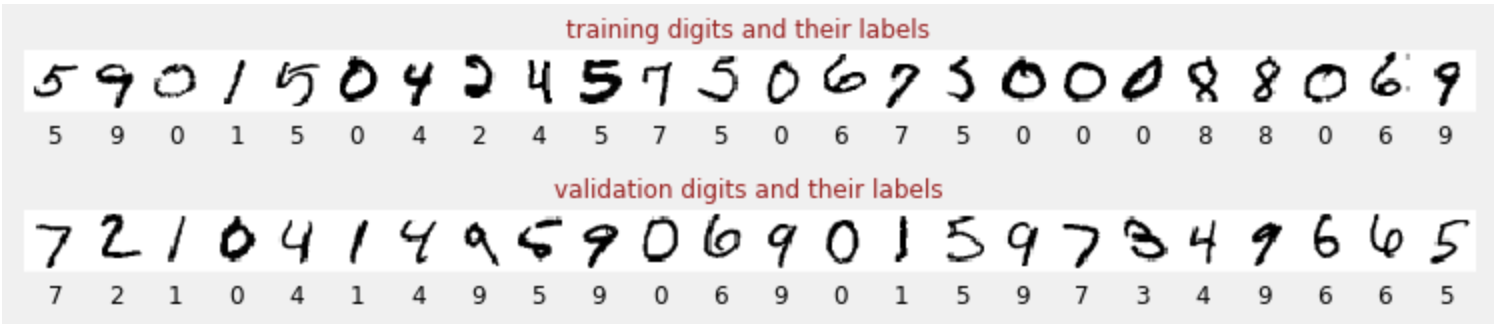
The MNIST dataset contains 60,000 labeled images of handwritten digits (0-9).
Each image is associated with its correct numerical label.
This “labeled dataset” is crucial for training.
Our neural network learns to classify these images into 10 classes (0 through 9).
Example MNIST Digits:
Training vs. Validation Datasets
How do we assess our model’s “real-world” performance?
Training Dataset: Used to update the model’s internal parameters. The model sees this data multiple times.
Validation Dataset: A separate, unseen labeled dataset to evaluate performance and prevent cheating. It reflects how well the model generalizes to new data.
Important
Using “unseen” data for validation is fundamental for robust model evaluation.
Monitoring Training Progress
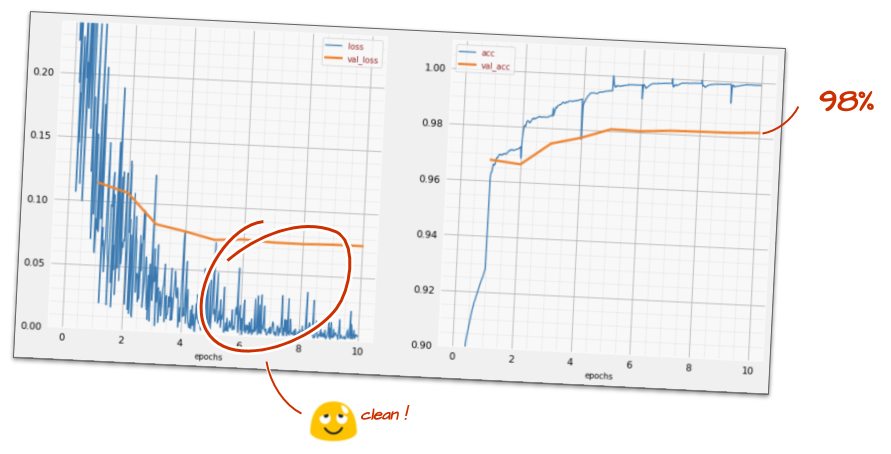
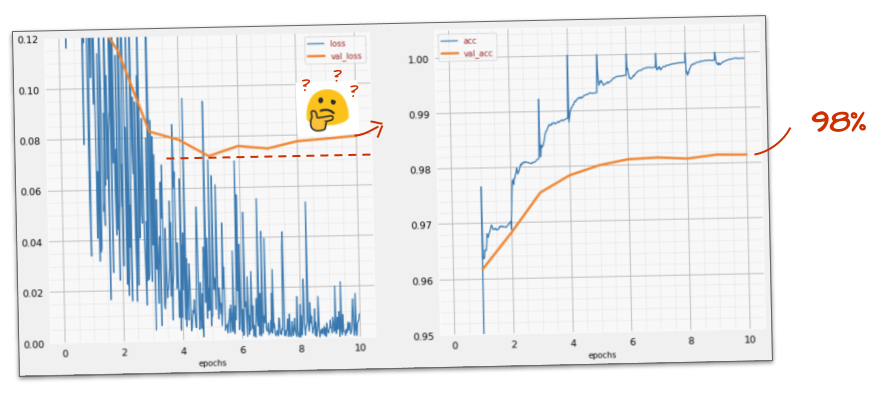
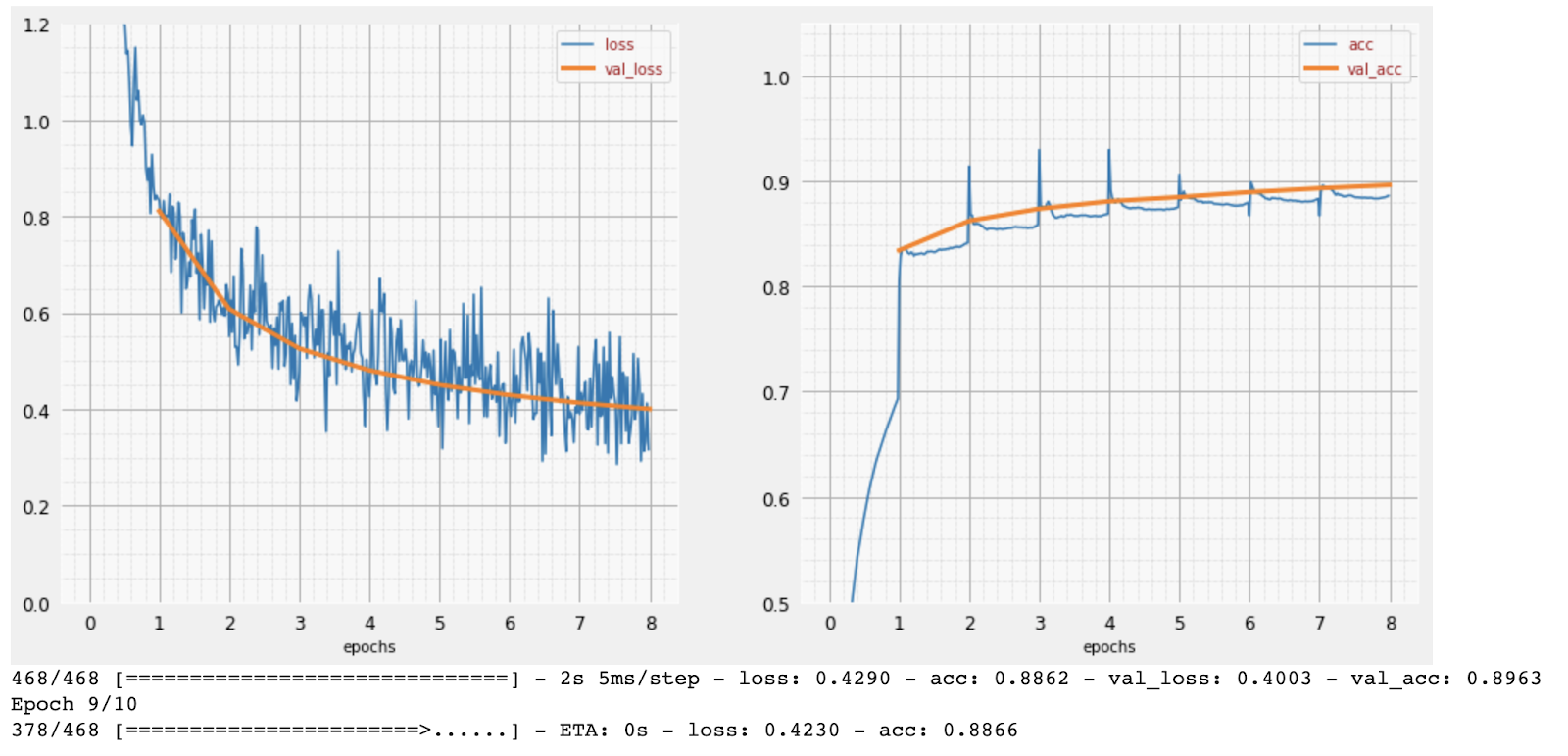
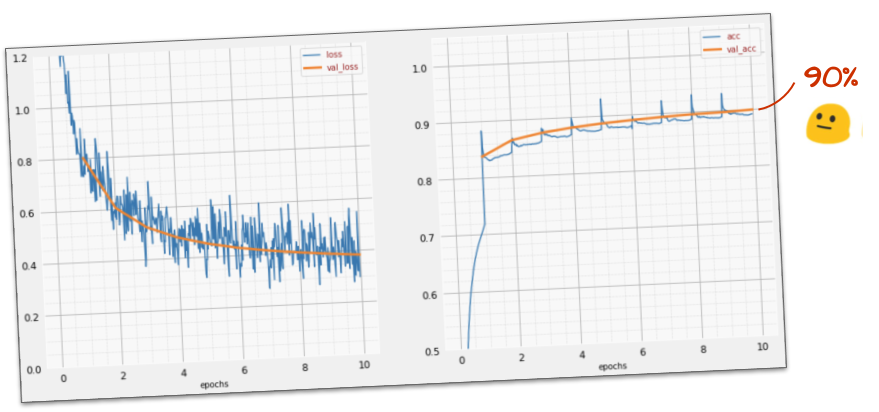
During training, we track two key metrics: accuracy and loss.
Accuracy (Right Plot):
Percentage of correctly recognized digits.
Should increase as training progresses.
Loss (Left Plot):
Measures how “badly” the model performs.
The goal is to minimize this value.
Should decrease on both training and validation data.
X-axis: Epochs (iterations over entire dataset)
Making Predictions
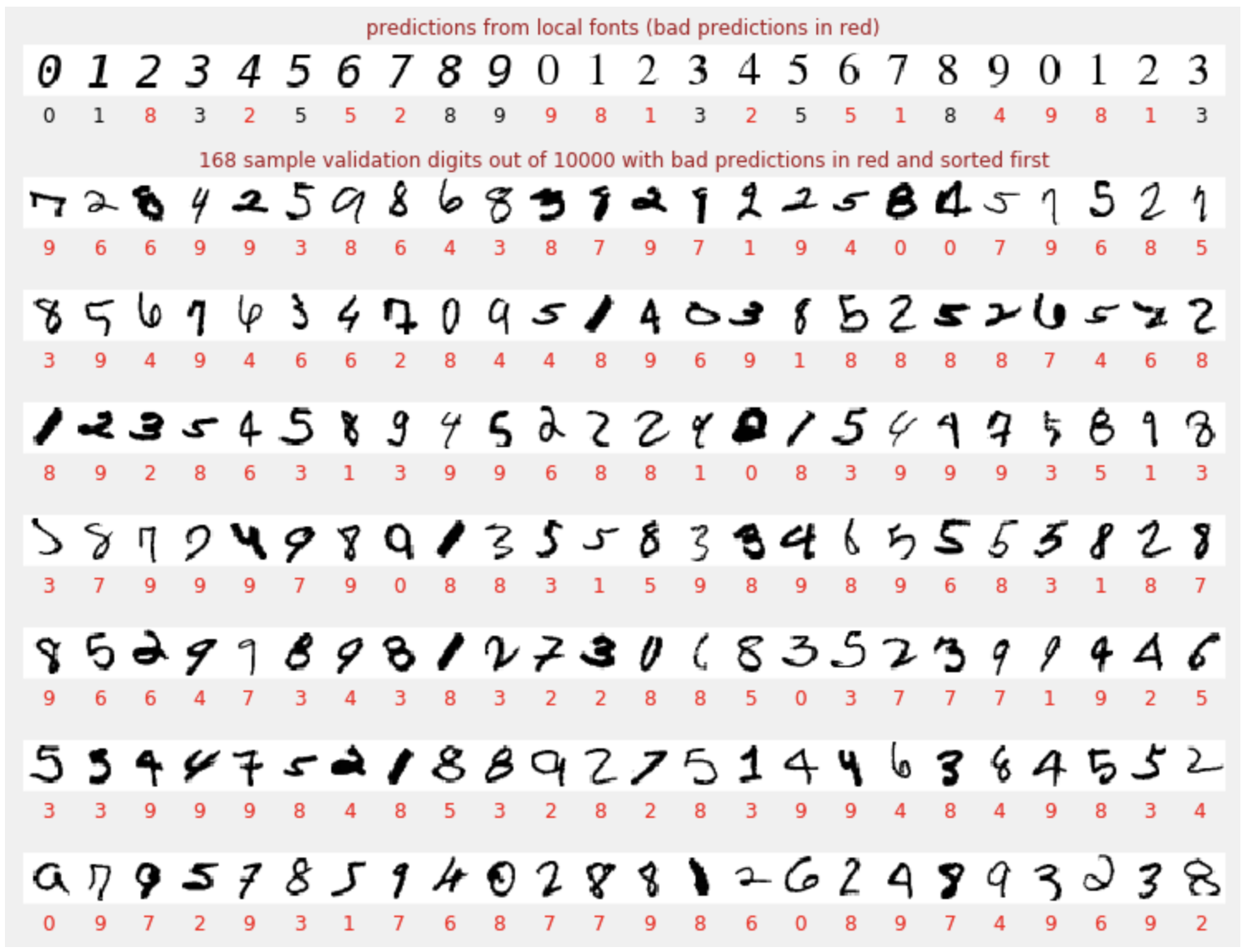
After training, the model can predict digits it hasn’t seen.
This initial model reaches ~90% validation accuracy, meaning it still misclassifies 1000 out of 10,000 validation digits.
Caution
Even 90% accuracy leaves room for improvement, especially in critical ECE applications like medical imaging or autonomous systems.
Understanding Tensors: The Language of Data
In deep learning, data is represented as tensors. Tensors are multi-dimensional arrays, analogous to vectors and matrices.
Grayscale Image (28x28 pixels): A 2D tensor (matrix) with shape [28, 28].
Color Image (28x28 pixels, RGB): A 3D tensor with shape [28, 28, 3]. (Height, Width, Color Channels)
Batch of Color Images (e.g., 128 images): A 4D tensor with shape [128, 28, 28, 3]. (Batch Size, Height, Width, Color Channels)
Note
The list of dimensions is called the “shape” of the tensor.
Understanding tensor shapes is crucial for building and debugging neural networks.
Interactive Example: Image Compression Analogy
Let’s visualize how much information we retain when we reduce the “dimensions” of an image. This is analogous to how neural networks extract features.
Neural Networks are powerful computational models inspired by the human brain. They are used to learn complex patterns from data.
For ECE, neural networks are crucial in:
Signal Processing: Noise reduction, feature extraction.
Image Recognition: Object detection, medical imaging analysis.
Control Systems: Adaptive control, robotics.
The Keras Sequential API
When building neural networks with TensorFlow and Keras, the Sequential API is a straightforward way to stack layers. This is ideal for models where layers have exactly one input tensor and one output tensor.
Example: Image Classifier using Dense Layers
model = tf.keras.Sequential([ tf.keras.layers.Flatten(input_shape=[28, 28, 1]), # Flattens input images tf.keras.layers.Dense(200, activation="relu"), # Hidden layer with ReLU tf.keras.layers.Dense(60, activation="relu"), # Another hidden layer tf.keras.layers.Dense(10, activation='softmax') # Output layer for 10 classes])model.compile( optimizer='adam', loss='categorical_crossentropy', metrics=['accuracy'])# Train the model# model.fit(dataset, ...)
What is a Neuron? The Basic Building Block
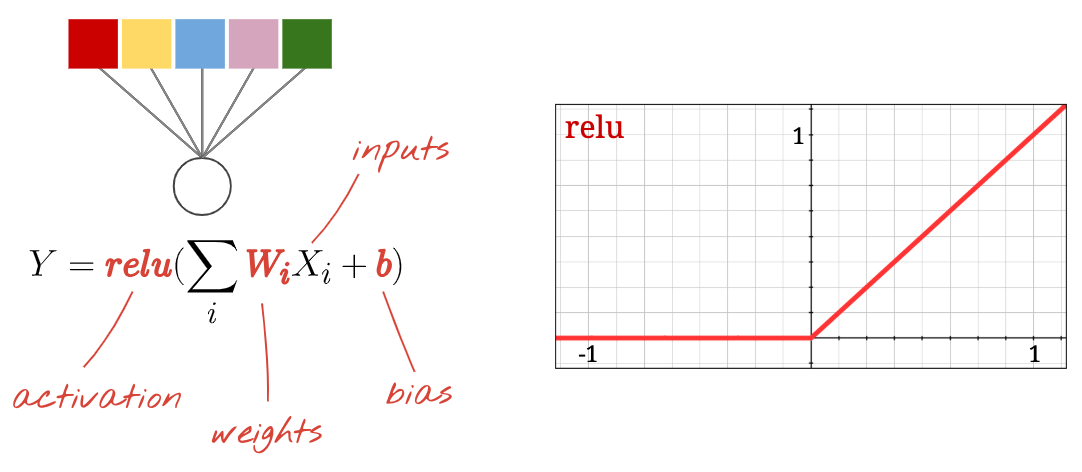
The fundamental unit of a neural network is the neuron, a concept analogous to a processing unit in digital circuits.
Each neuron performs three main operations:
Weighted Sum: Multiplies each input by a corresponding weight and sums them up.
Bias Addition: Adds a bias constant to the weighted sum.
Activation: Passes the result through a non-linear activation function.
The weights (W) and biases (b) are the parameters learned during training. Initially, they are random and get adjusted to minimize error.
neuron.png
Tip
Think of weights as variable resistors and biases as constant voltage offsets in an analog circuit. The activation function is like a threshold detector or a non-linear amplifier.
Single Dense Layer: MNIST Example
Let’s consider classifying handwritten digits from the MNIST dataset. Each image is 28x28 pixels grayscale.
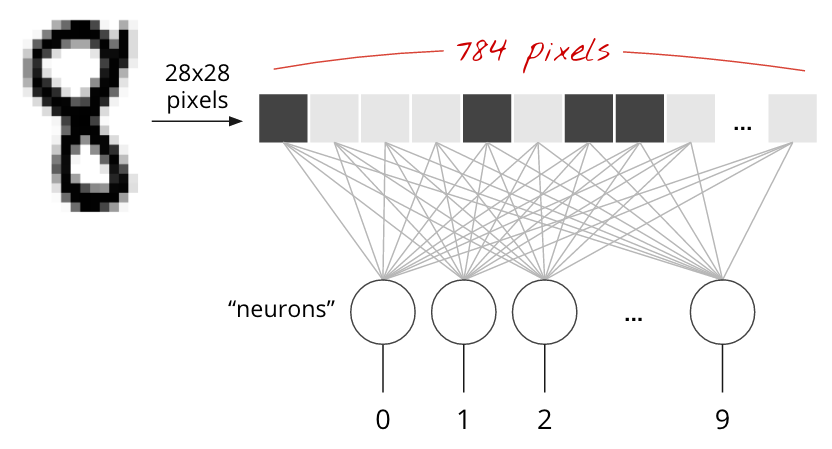
The simplest neural network for this task uses 784 pixels (28x28) as inputs to a single dense layer.
This layer has 10 output neurons, one for each digit class (0-9).
Each of these 10 output neurons takes all 784 pixel values as input, performs a weighted sum, adds a bias, and applies an activation.
Matrix Multiplication for a Single Layer
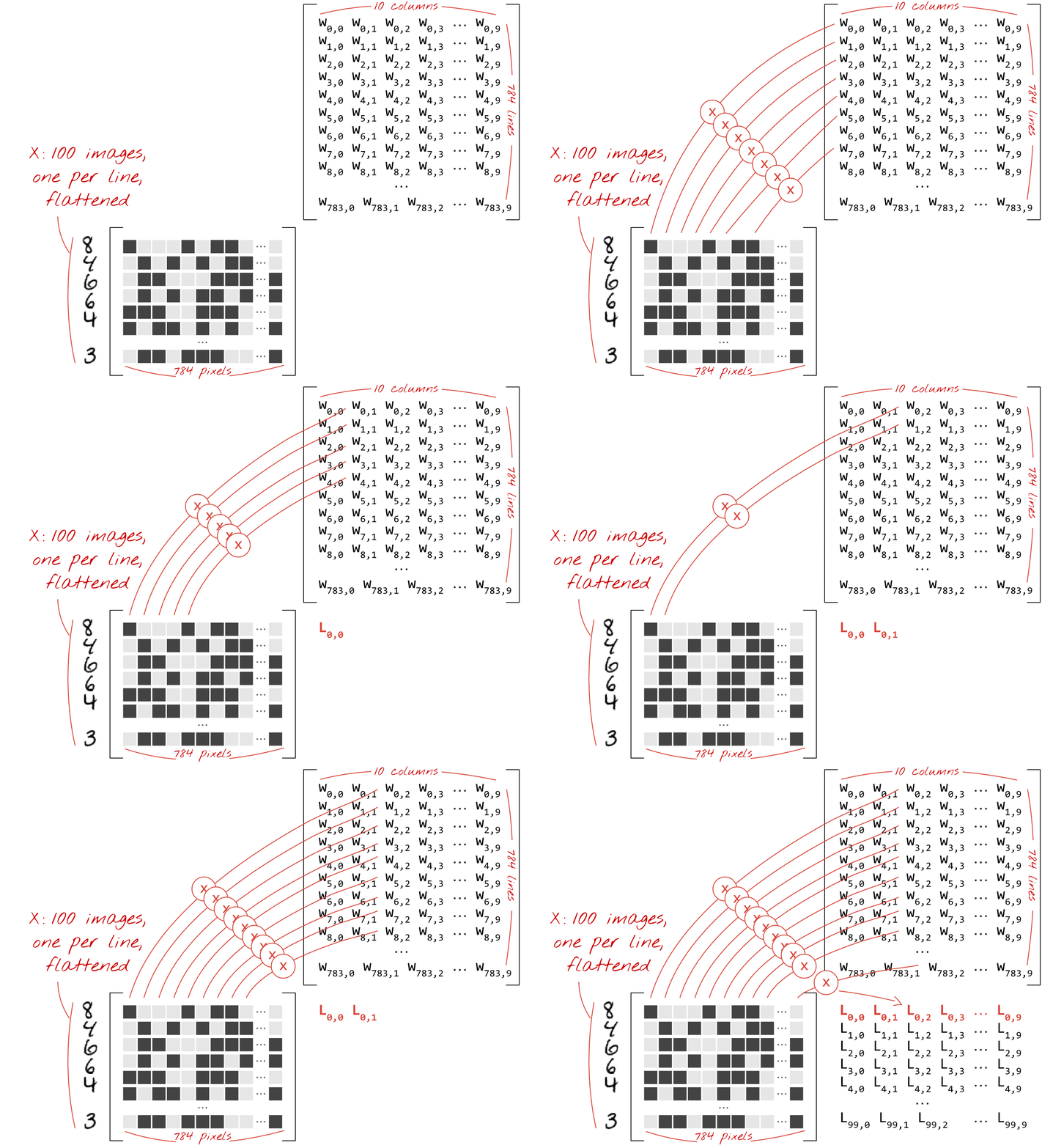
A dense layer’s operations can be efficiently represented using matrix multiplication.
If X is a matrix of 100 images (each flattened to 784 pixels), and W is the weight matrix (784 inputs x 10 outputs), then:
\[ \text{Weighted Sums} = X \cdot W \]
\[ \text{Output} = \text{Activation}(X \cdot W + b) \]
Where b is the bias vector (10 elements), broadcasted across the 100 images.
Matrix Multiplication for a Single Layer
matmul.gif
In Keras, this is simplified:tf.keras.layers.Dense(10, activation='softmax')
Going Deep: Chaining Layers
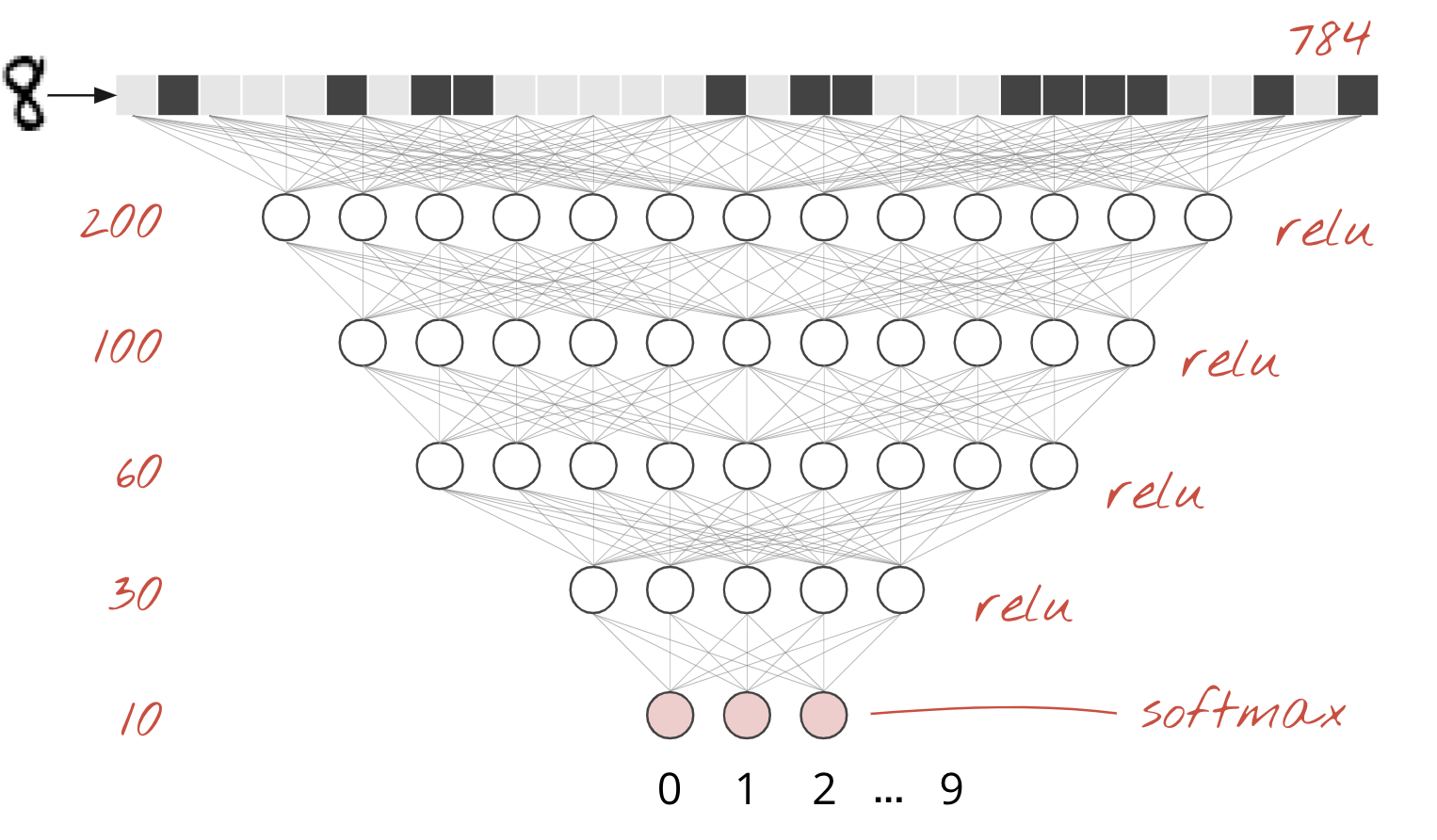
“Deep learning” refers to using multiple hidden layers. Each layer computes weighted sums of the outputs of the previous layer.
This architecture allows the network to learn progressively more complex and abstract features from the raw input data.
For example, early layers might detect edges or simple shapes, while later layers combine these to recognize parts of objects or entire objects.
The choice of activation function is critical and typically changes only for the very last layer in a classifier.
Going Deep: Chaining Layers
fba0638cc213a29.png
Activation Functions: ReLU and Softmax
Activation functions introduce non-linearity, allowing neural networks to learn complex, non-linear relationships in data.
Used in the output layer of multi-class classifiers.
Converts logits into probabilities that sum to 1.
sigmoid.png
relu.png
Softmax in Action: Interactive Example
Adjust the Logit Value for a single class and observe how Softmax normalizes probabilities. Here, we simulate 10 classes, with one Logit Value adjusted at a time.
viewof logit_val = Inputs.range([0,10], {step:0.1,value:5,label:"Logit Value for Class 0 (others fixed at 1.0)"});
Loss Function: Cross-Entropy
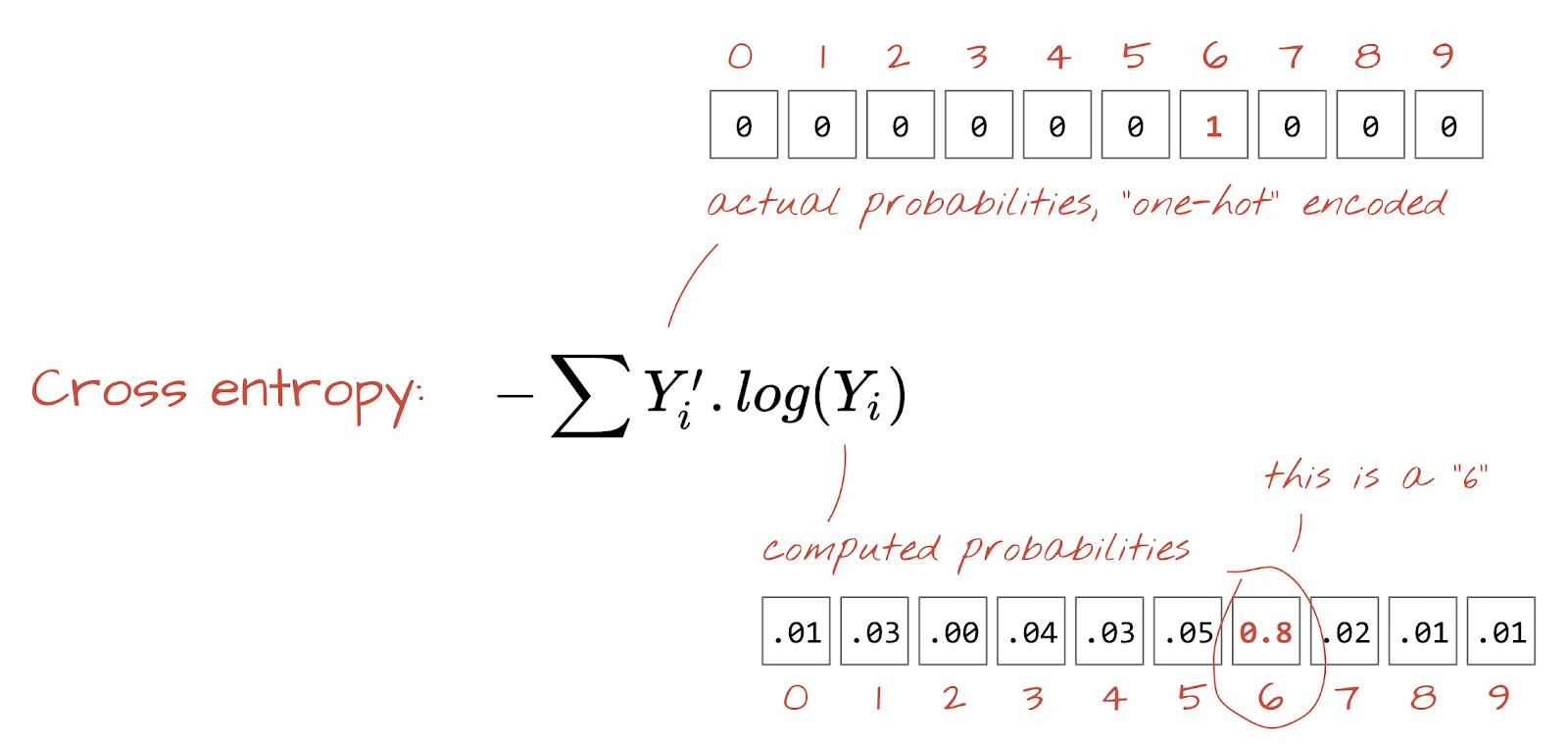
To train a neural network, we need to measure how “wrong” its predictions are compared to the true labels. This measure is called the loss function.
For multi-class classification, Cross-Entropy Loss is the standard.
\[ H(p, q) = - \sum_{i=1}^{K} p_i \log(q_i) \]
Where: * \(p_i\) is the true probability for class \(i\) (1 for the correct class, 0 otherwise). * \(q_i\) is the predicted probability for class \(i\) (output of softmax). * \(K\) is the number of classes.
Note
Cross-entropy loss heavily penalizes incorrect high-confidence predictions, guiding the network to both be correct and confident.
Loss Function: Cross-Entropy
cross_entropy.png
Training: Gradient Descent
“Training” a neural network means iteratively adjusting its weights and biases to minimize the loss function. This is achieved using an optimization algorithm called Gradient Descent.
Compute Gradient: Calculate the partial derivatives of the loss function with respect to every weight and bias. This “gradient” vector points in the direction of the steepest increase of the loss.
Update Parameters: Adjust weights and biases in the opposite direction of the gradient, typically by a small step size called the learning rate.
We’ll cover core components: - Model Parameters and Imports - Data Preparation with tf.data.Dataset - Building a Keras Sequential Model - Training and Validation - Visualizing Predictions
Model Parameters and Imports
These initial cells set up the environment and define global constants.
Parameters Cell:
Sets values for:
BATCH_SIZE: Number of samples processed per gradient update.
EPOCHS: Number of complete passes through the training dataset.
GCS_PATTERN: Location of MNIST data files on Google Cloud Storage.
Imports Cell:
Imports necessary libraries:
tensorflow (tf): Core Deep Learning framework.
numpy (np): For numerical operations (especially tensor manipulation).
matplotlib.pyplot (plt): For plotting and visualization.
# Example of ParametersBATCH_SIZE =64EPOCHS =5GCS_PATTERN ="gs://cloud-tpu-datasets/mnist/mnist_{}.tfrec"print(f"Batch Size: {BATCH_SIZE}")print(f"Epochs: {EPOCHS}")
# Example of Importsimport tensorflow as tfimport numpy as npimport matplotlib.pyplot as pltprint("TensorFlow version:", tf.__version__)print("NumPy version:", np.__version__)
Data Preparation with tf.data.Dataset
The tf.data.Dataset API is powerful for building efficient data pipelines. It handles loading, parsing, and preprocessing data, especially at scale.
Key Steps:
Load Fixed-Length Records: Images and labels are stored in tfrec files. We decode raw byte strings into images (float32, normalized 0-1) and flatten them.
optimizer='sgd' (Stochastic Gradient Descent): The algorithm used to update the model’s weights based on the loss. SGD is a foundational optimizer for neural networks.
loss='categorical_crossentropy': The loss function measures the discrepancy between predicted and true class probabilities. Categorical crossentropy is standard for multi-class classification when labels are one-hot encoded.
metrics=['accuracy']: Additional metrics to monitor during training and evaluation. 'accuracy' measures the percentage of correct predictions.
Model Summary & Training Utility
After compilation, we can inspect the model’s architecture.
model.summary():
Prints a detailed overview of the model:
Layers (type, output shape).
Number of trainable parameters in each layer.
Total parameters in the model.
This is invaluable for debugging and understanding model complexity.
PlotTraining Callback:
A custom utility (from the notebook) to visualize training curves dynamically. It shows loss and accuracy for both training and validation sets in real-time.
import tensorflow as tf# Define a simple model for demonstrationmodel_summary_demo = tf.keras.Sequential([ tf.keras.layers.Input(shape=(28*28,)), # For MNIST, inputs are 784-element vectors tf.keras.layers.Dense(10, activation='softmax') # 10 output classes])# Simulate compile for summary to show expected parametersmodel_summary_demo.compile(optimizer='sgd', loss='categorical_crossentropy', metrics=['accuracy'])# Print the model summarymodel_summary_demo.summary()
Training and Validation
The model.fit() function is where the actual learning takes place.
model.predict(input_data): Generates output predictions for the input samples. For a classification model with softmax activation, it returns a 2D array where each row is a probability distribution over the classes for one input. (e.g., [[0.01, 0.05, ..., 0.90, ..., 0.02], ...])
np.argmax(probabilities, axis=1): Converts the probability distributions into a single predicted class label.
np.argmax(): Returns the index of the maximum value.
axis=1: Specifies to find the maximum along the “class” dimension (i.e., for each image, find the class with the highest probability).
Visualizing Predictions
Note
This simple 1-layer model already achieves ~90% accuracy! But we can do much better.
Adding Layers: Going Deeper
To improve our model’s accuracy beyond 90%, we need to add more layers. This allows the network to learn more complex, hierarchical features.
The Concept of Depth
A deeper network can model non-linear relationships more effectively.
Each hidden layer learns increasingly abstract representations of the input data.
Activation Functions Revisited
While softmax is for the output layer of a classifier, hidden layers need different activation functions.
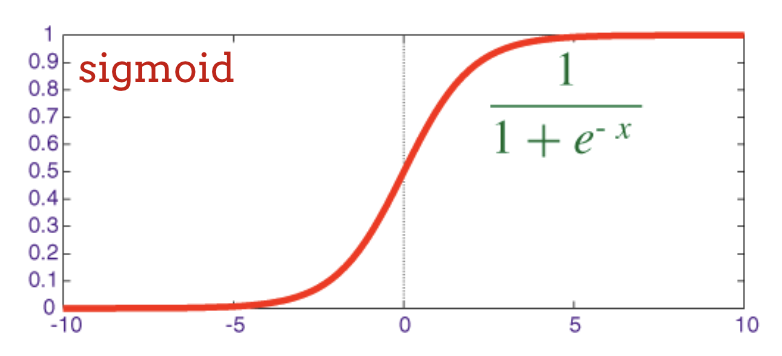
Sigmoid Activation Function
For intermediate (hidden) layers, the sigmoid function is a classical choice:
\[ \sigma(x) = \frac{1}{1 + e^{-x}} \]
Output Range: Maps any input to a value between 0 and 1.
Interpretation: Can be seen as a “soft” switch, where values close to 0 or 1 indicate strong decisions.
Historical Significance: Widely used in early neural networks.
Plot of the Sigmoid Function
Designing a Deeper Model
Let’s expand our simple model by adding two hidden Dense layers with sigmoid activation.
Hidden Layer 1: 200 neurons with sigmoid activation.
Hidden Layer 2: 60 neurons with sigmoid activation.
Output Layer: Remains 10 neurons with softmax for classification.
Note
Notice the increase in the number of parameters with multiple layers. Run this model in the Colab notebook.
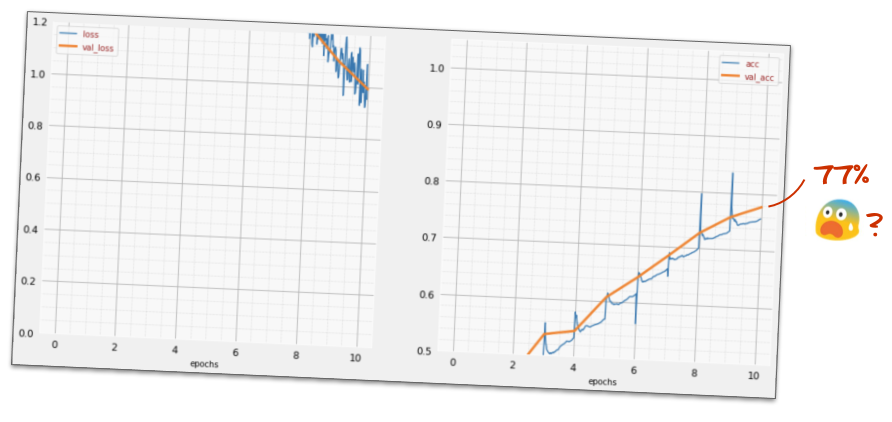
Unexpected Behavior: What Happened?
Despite adding layers and parameters, the model doesn’t always improve as expected.
High Loss: The training loss and validation loss are extremely high.
Low Accuracy: Accuracy barely increases above random guessing (around 10%).
Warning
More parameters don’t automatically mean better performance. Deeper networks introduce new challenges!
Why Did the Deeper Model Fail? The Vanishing Gradient Problem
The sigmoid activation function can hinder learning in deep networks.
The Problem:
The gradient (derivative) of the sigmoid function is very small for inputs far from 0.
In a deep network, these small gradients are multiplied together during backpropagation.
This causes gradients to “vanish” as they propagate back to earlier layers.
Consequence for ECE:
Early layers’ weights are hardly updated.
The network struggles to learn useful features from the input.
Training stalls, leading to poor performance.
Important
This is a common issue with traditional activation functions like sigmoid and tanh in deep architectures.
Special Care for Deep Networks
The “AI winter” of the 80s and 90s was partly due to the challenges of training deep networks. Modern deep learning thrives due to “dirty tricks” that ensure convergence.
Overcoming Deep Network Challenges
RELU Activation: A simple yet powerful non-linearity.
Better Optimizers: Algorithms that navigate complex loss landscapes.
Careful Initialization: Setting initial weights to facilitate learning.
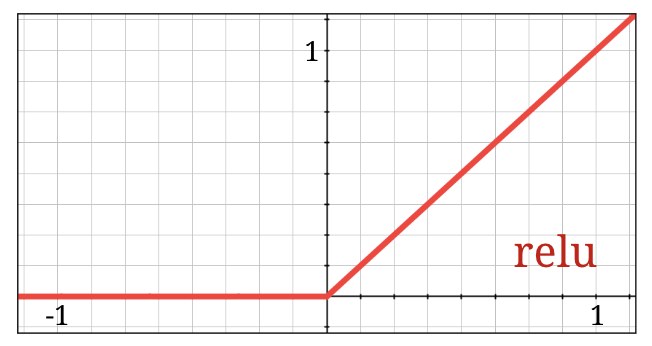
The sigmoid function’s vanishing gradients made it problematic for deep networks. The Rectified Linear Unit (RELU) is the de-facto standard activation today.
\[ \text{ReLU}(x) = \max(0, x) \]
Simplicity: Returns x for positive inputs, 0 for negative inputs.
Gradient: Has a constant gradient of 1 for positive inputs.
Benefits for ECE:
Mitigates vanishing gradient problem.
Speeds up convergence.
Computationally much cheaper than sigmoid/tanh.
Plot of the ReLU Function
Note
Replace activation='sigmoid' with activation='relu' in hidden layers. The output layer retains softmax for classification.
Better Optimizers: Beyond SGD
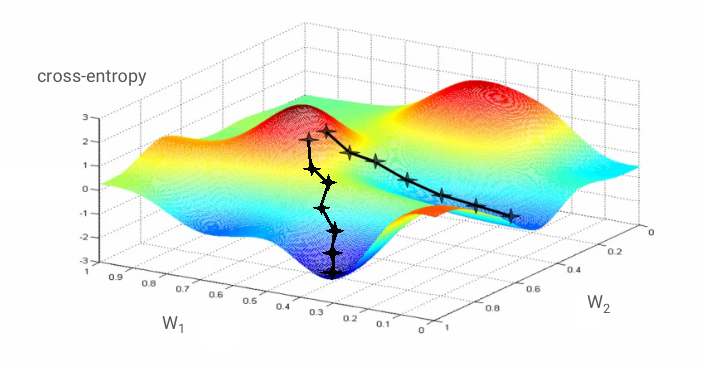
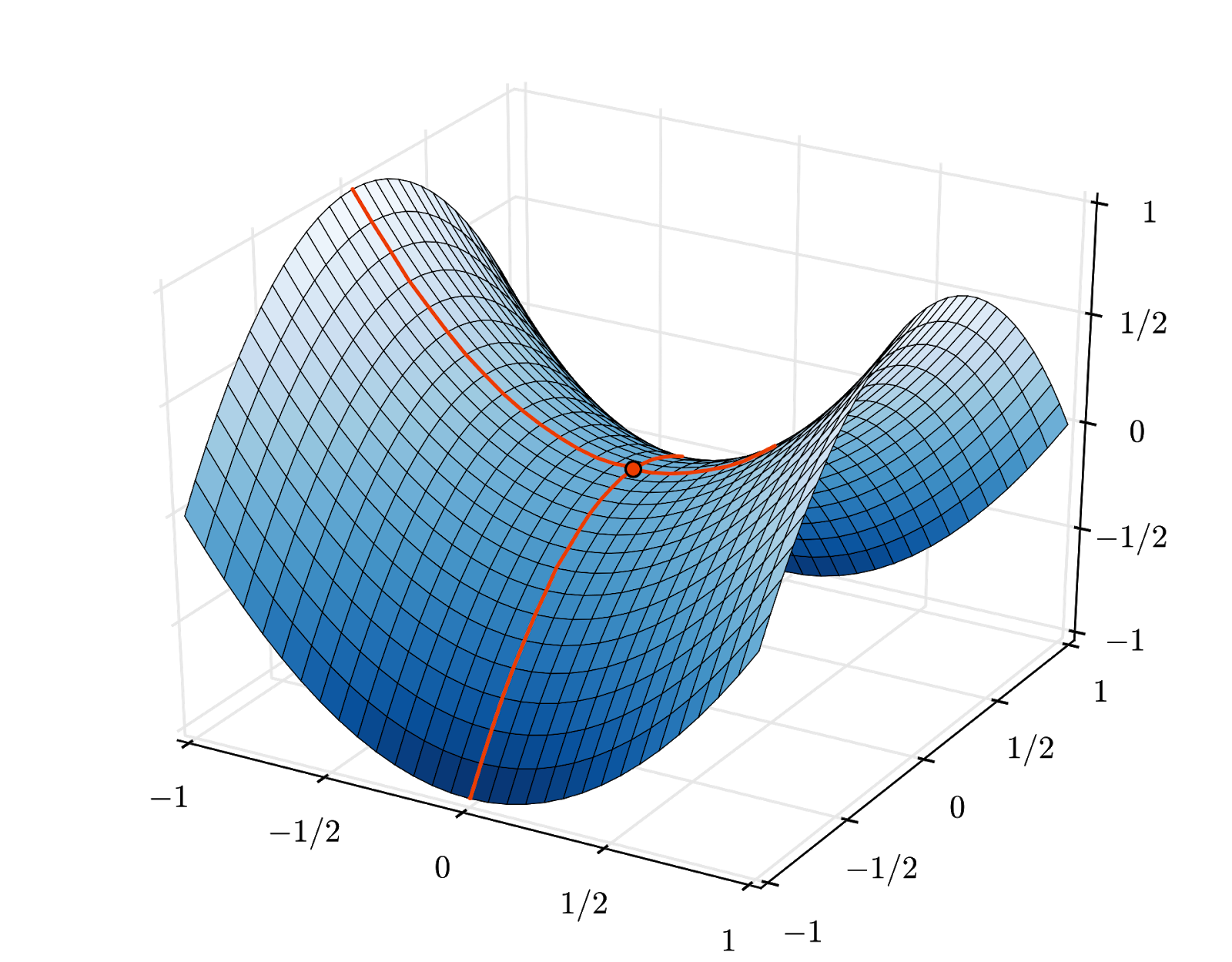
Stochastic Gradient Descent (SGD) can get stuck in “saddle points” in high-dimensional spaces.
Modern optimizers are more robust and efficient.
Saddle Points:
Points in the loss landscape where the gradient is zero, but it’s not a true minimum.
SGD can get stuck here, preventing further learning.
Adaptive Optimizers:
Use concepts like “momentum” and “adaptive learning rates” for each parameter.
Help the model “sail past” saddle points and converge faster.
Examples: Adam, RMSprop, Adagrad.
Keras Implementation:
Update the optimizer in model.compile:
model.compile(optimizer='adam', # Use Adam optimizer
              loss='categorical_crossentropy',
              metrics=['accuracy'])
Tip
Adam is widely considered a good default choice for most deep learning tasks.
Weight Initialization & Numerical Stability
Two critical, often hidden, factors for stable deep network training.
1. Random Initializations:
How the network’s weights and biases are set before training begins.
Poor initialization can lead to slow convergence or vanishing/exploding gradients.
Keras Default: Uses 'glorot_uniform' (also known as Xavier uniform).
Designed to keep activation values and gradients roughly in the same scale across layers.
No action needed: Keras handles this optimally by default.
2. Numerical Stability (NaNs):
Categorical crossentropy involves log(). If input to log is 0, it’s NaN (Not a Number).
softmax output (probabilities) can be numerically 0 in float32 despite being mathematically non-zero.
Keras Solution:tf.keras.losses.CategoricalCrossentropy(from_logits=True)
Computes softmax and crossentropy together in a numerically stable way.
No action needed: Keras handles this automatically when softmax is the last activation and categorical_crossentropy is the loss.
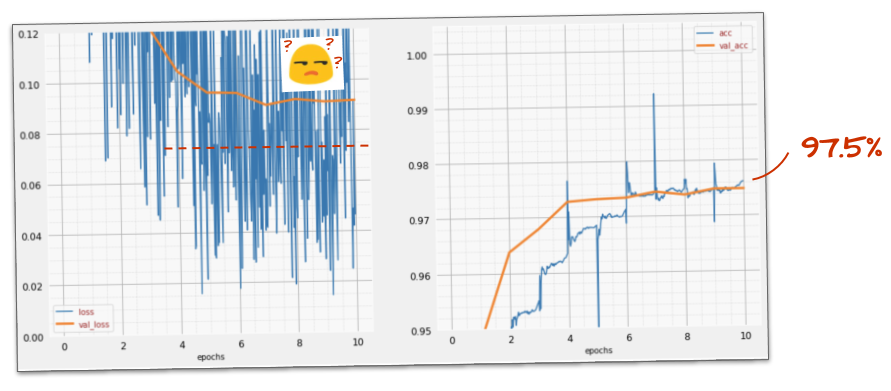
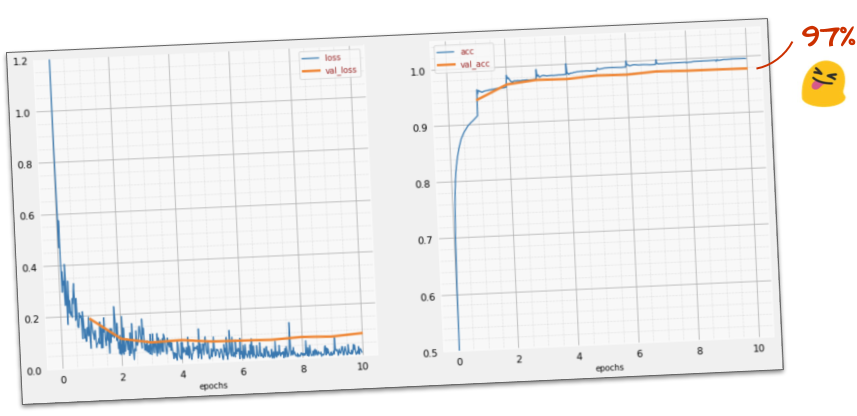
Success So Far: ~97% Accuracy!
With ReLU activation and the Adam optimizer, our deeper model should now converge effectively.
You should observe:
Training and validation loss decreasing steadily.
Training and validation accuracy climbing to around 97%.
This marks a significant improvement over the initial 90% and the failed deep sigmoid model.
We’re approaching our goal of “significantly above 99% accuracy!”
(Example of ~97% accuracy training curves)
Tip
If you’re stuck, refer to keras_02_mnist_dense.ipynb in the Colab repo.
Learning Rate Decay: Fine-Tuning Convergence
Training too fast can lead to noisy convergence or even divergence. A learning rate decay schedule starts fast and slows down over time.
This doesn’t mean dropout failed; it indicates the model is being forced to learn differently.
We are pushing it to generalize better, not just memorize.
Deeper Roots of Overfitting: The Nature of the Problem
Overfitting isn’t always easily fixed by dropout alone; it stems from fundamental issues.
1. “Too Many Degrees of Freedom”:
If a network is too large for the complexity of the data, it can simply “memorize” training examples.
It fails to extract underlying patterns, resulting in poor generalization.
Analogy for ECE:
Imagine fitting a 10th-order polynomial to only three data points. It will perfectly hit those points but be wild everywhere else.
2. Insufficient Training Data:
Neural networks are data-hungry.
With too little data, even a reasonably sized network can overfit because there isn’t enough variety to learn robust patterns.
3. Inadequate Network Architecture:
Sometimes, the chosen network type isn’t suitable for the data’s structure.
Our current Dense (fully-connected) only network struggles with image spatial relationships.
Introduction to Convolutional Neural Networks (CNNs)
Our current model struggles because it treats image pixels as independent features, losing spatial context. Convolutional Neural Networks (CNNs) are designed to leverage this spatial information.
Key Idea:
Instead of fully-connected layers, CNNs use convolutional filters (kernels).
These filters slide across the input image, detecting local features like edges, corners, and textures.
They preserve the spatial relationships between pixels.
 (Example of ~97% accuracy training curves)