Machine Learning

5. Deep Learning: AE, TL

Imron Rosyadi

Autoencoders

What Is an Autoencoder?

A neural network designed to learn an efficient data encoding (compression)
and then reconstruct the input data from that encoding (decompression).

Tip

Core Idea: Learn a compressed, “latent” representation of data without supervision.

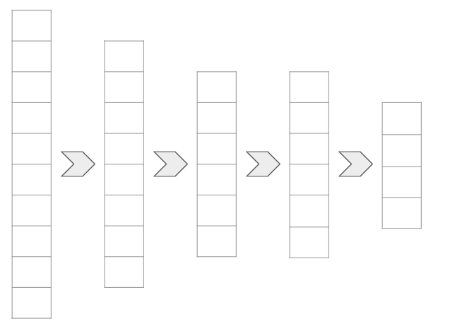
Encoder

The encoder is a neural network that transforms input data into a smaller,
lower-dimensional representation.

  • Goal: Reduce data dimensionality while retaining essential information.
  • Layers: Can use dense, convolutional, pooling layers, etc.
  • Output: A compressed “latent space” representation.
Decoder

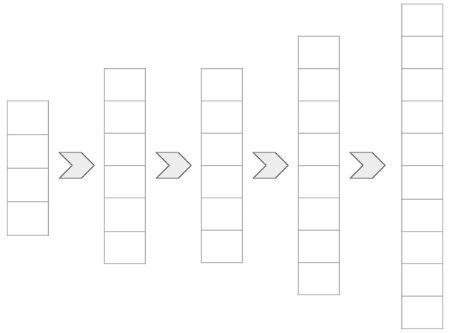
The decoder performs the reverse operation of the encoder.

  • Input: The compressed latent representation from the encoder.
  • Goal: Reconstruct an approximation of the original input data.
  • Method: Expands the data back to its original dimensions.
Decoder: Upsampling

To expand the data in the decoder, we use upsampling techniques.

  • Concept: Reverse of pooling; expands input dimensions.
  • UpSampling2D: Commonly used in TensorFlow Keras for image data.
  • Example: Doubles spatial dimensions (e.g., 4x4 to 8x8).
tf.keras.layers.UpSampling2D(
    size=(2, 2)
)
conv2d_3 (Conv2D)            (None, 4, 4, 16)          2320      
_________________________________________________________________
up_sampling2d (UpSampling2D) (None, 8, 8, 16)          0      

Autoencoder

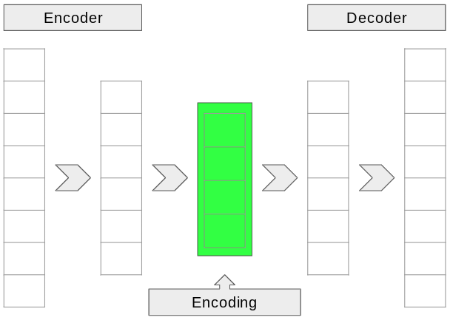
Combining the encoder and decoder forms an autoencoder.

  • Encoder: Learns efficient data representation.
  • Decoder: Reconstructs data from the encoded representation.
  • “Lossy” Compression: Output is an approximation, not exact replica.

Important

The autoencoder aims to reconstruct its own input.
What Are Autoencoders Good For?

  • Lossy Data Compression: Efficiently reduce data size.
  • Non-linear Principal Component Analysis (PCA): Discover underlying data structure.
  • Data Denoising/Cleaning: Remove noise or artifacts from data.
  • Feature Learning: Extract meaningful features for other ML tasks.
  • Anomaly Detection: Identify data points that deviate from learned patterns.

Keras Model: Building the Encoder

Utilize the Keras Model class for flexible architecture.

from tensorflow.keras.layers import Conv2D, MaxPool2D, UpSampling2D, Input
from tensorflow.keras.models import Model

# Define input layer
input_layer = Input(shape=(28, 28, 1), name='input_image')

# Encoder path
conv_layer = Conv2D(32, (3, 3), activation='relu', padding='same')(input_layer)
latent_layer = MaxPool2D((2, 2), padding='same')(conv_layer)

# Define the encoder model
encoder = Model(input_layer, latent_layer, name='encoder')

print(encoder.summary())

Note

The latent_layer represents the compressed output of the encoder.

Keras Model: Assembling the Autoencoder

Connect encoder and decoder using the Keras Functional API.

from tensorflow.keras.layers import Conv2D, MaxPool2D, UpSampling2D, Input
from tensorflow.keras.models import Model

# Example placeholder for decoder output (in a real model, this would be built from latent_layer)
# For this example, let's just make a simple decoder structure
latent_input = Input(shape=(14, 14, 32), name='latent_input')
conv_decoder = Conv2D(32, (3, 3), activation='relu', padding='same')(latent_input)
up_sample = UpSampling2D((2, 2))(conv_decoder)
output_layer = Conv2D(1, (3, 3), activation='sigmoid', padding='same')(up_sample) # Assuming 1-channel output like original input

# Define the encoder model (as on previous slide)
input_autoencoder = Input(shape=(28, 28, 1), name='input_image_autoencoder')
encoder_conv = Conv2D(32, (3, 3), activation='relu', padding='same')(input_autoencoder)
latent_encoded = MaxPool2D((2, 2), padding='same')(encoder_conv)
encoder = Model(input_autoencoder, latent_encoded, name='encoder')

# Define the decoder model
decoder = Model(latent_input, output_layer, name='decoder')

# Connect them to form the autoencoder
autoencoder = Model(
    input_autoencoder,
    decoder(encoder(input_autoencoder)),
    name="autoencoder"
)

print(autoencoder.summary())

Tip

Training the autoencoder model simultaneously trains both the encoder and decoder sub-models.

Interactive Convolution Visualization

Explore how a 2D convolution filter processes an input matrix.
Adjust filter size and visualize the output.

Note

This visualization shows a single convolution operation with a simple filter.

Your Turn!

Now it is your turn to apply what you’ve learned about autoencoders.
In the lab, you will work through examples of:

  • Using an autoencoder for image compression.
  • Applying autoencoders for denoising (e.g., removing static from images).
  • An exercise to remove a watermark from a video or image.

What specific ECE applications do you envision for autoencoders, beyond those discussed?

Image Classification Project

Identifying Pneumonia from X-rays

This project consolidates your knowledge of image classification.
You will apply various techniques learned throughout the course.

Note

Focus on building, evaluating, and tuning models for a real-world medical imaging task.

Image Classification Project: Chest X-rays

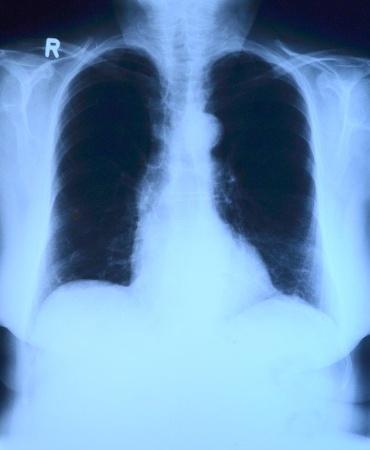
You will work with a dataset of chest X-ray images.

  • Task: Classify images as either NORMAL or PNEUMONIA.
  • Source: Dataset from Kaggle, pre-divided for training, testing, and validation.
  • Relevance: Demonstrates ML application in medical diagnostics.
Review: What is Convolution?

  • Definition: A mathematical operation involving two functions to produce a third.
  • Image Processing: A “filter” (kernel) slides over an input image.
  • Process: Element-wise multiplication of filter with image region, then sum.
  • Goal: Detect specific features (e.g., edges, textures) in the image.
  • Parameters: Filter size, stride, padding.
flowchart LR
    subgraph "Input Image"
        A["Pixel Grid"]
    end

    subgraph "Filter (Kernel)"
        B["Small Matrix"]
    end

    subgraph "Operation"
        C(("Slide & Multiply-Add"))
    end

    subgraph "Output"
        D["Feature Map"]
    end

    A -- "Apply Filter" --> C
    B -- "Over Region" --> C
    C --> D

    style A fill:#cef,stroke:#333,stroke-width:2px
    style B fill:#fec,stroke:#333,stroke-width:2px
    style C fill:#ccf,stroke:#333,stroke-width:2px
    style D fill:#cfc,stroke:#333,stroke-width:2px

Review: Convolutional Neural Network (CNN) Architecture

  • Key Components:
    • Convolutional Layers: Feature extraction using filters.
    • Pooling Layers: Downsampling to reduce dimensionality and computational cost.
    • Activation Functions: Introduce non-linearity (e.g., ReLU).
    • Fully Connected Layers: Classification based on extracted features.
  • Tunable “Knobs”:
    • Number of layers, layer order.
    • Filter size, number of filters, stride.
    • Pooling size, type of pooling.
    • Activation functions (e.g., ReLU, Sigmoid for output).
    • Dropout rates, learning rate, batch size.

CNN_Architecture Input Input Image (e.g., 256x256x3) Conv1 Conv Layer 1 (Filters, Kernel, Stride) Input->Conv1 Feature Extraction Pool1 Pooling Layer 1 (Max/Avg Pool) Conv1->Pool1 Downsampling Conv2 Conv Layer 2 Pool1->Conv2 Pool2 Pooling Layer 2 Conv2->Pool2 Flatten Flatten Layer Pool2->Flatten Vectorization Dense1 Dense Layer 1 (ReLU) Flatten->Dense1 Classification Output Output Layer (Softmax/Sigmoid) Dense1->Output

Image Classification Project: Dataset Structure

The dataset is pre-organized into standard machine learning splits.

chest_xray/
     ├── test/
     │       ├── NORMAL/
     │       └── PNEUMONIA/
     ├── train/
     │       ├── NORMAL/
     │       └── PNEUMONIA/
     └── val/
             ├── NORMAL/
             └── PNEUMONIA/
  • train set: Used for model training.
  • test set: For hyperparameter tuning and model selection.
  • val set: Final, unbiased evaluation of model generalization.

Image Classification Project: Tips for Success

  • Enable GPU: Significantly speeds up training for image models.
    • In Google Colab: Runtime > Change runtime type > Hardware accelerator > GPU.
  • Perform Exploratory Data Analysis (EDA):
    • Verify dataset integrity and structure.
    • Check for image dimensions, class balance, and potential anomalies.
  • Data Augmentation: Consider techniques like rotation, flipping, zooming to expand training data.
  • Transfer Learning: Explore pre-trained models for faster convergence and better performance.

What challenges do you anticipate when working with medical image data?

Your Turn!

Now, apply your skills to the Image Classification Project.
Good luck building a robust pneumonia detection model!

What strategies will you prioritize for model evaluation and fine-tuning?

Transfer Learning

Leveraging Pre-trained Models

Concept: Reusing a pre-trained model as a starting point for a new task.

  • Traditional ML: Models trained from scratch on specific datasets.
  • Transfer Learning: Utilizes knowledge gained from a large, general dataset.
  • Benefit: Accelerates training, improves performance with limited data.

Important

Why train from scratch when you can stand on the shoulders of giants?

Transferring Knowledge: Human Analogy

Just as humans learn by building upon existing knowledge,
ML models can benefit from “transferred” insights.

  • Direct Learning: Observing examples directly.
  • Knowledge Transfer: Gaining insights from others’ experiences or related domains.
  • Efficiency: Speeds up the learning process for new, related tasks.

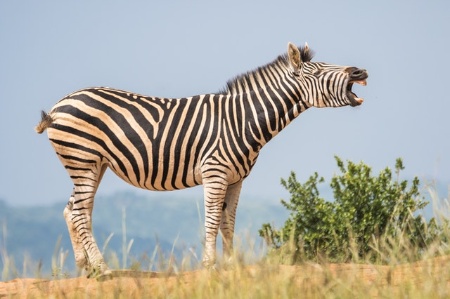
Transferring Knowledge: The Zebra Example

Imagine identifying a zebra:

  • Knowns: Horse shape, tiger stripes, penguin colors.
  • Transferred Knowledge: Combining these known features accelerates zebra identification.
  • ML Parallel: A model good at general image recognition can quickly adapt to new categories.
Transfer Learning: High-Level Overview

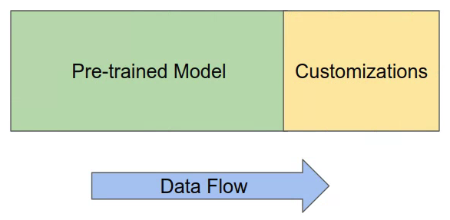
Typically involves attaching new layers to a pre-trained base model.

  • Pre-trained Model: Base model with learned weights (e.g., ImageNet classifier).
  • Customization Model: New, untrained layers added on top.
  • Data Flow: Input goes through pre-trained model, then into new layers.
  • Output: The final prediction from the new layers.
Do You Retrain the Pre-Trained Model?

The decision to retrain (fine-tune) the pre-trained model’s weights depends on several factors:

  • “Freezing” Weights:
    • Usually “No”: If new data is small or classes don’t largely overlap.
    • Benefit: Prevents overfitting, faster training of new layers.
  • Fine-tuning Weights:
    • Sometimes “Yes”: If new data is large and similar to original training data.
    • Method: Unfreeze some or all layers and train with a very small learning rate.
  • Layer-Specific Freezing: Often, layers closer to the input are frozen, while later layers are fine-tuned.

Which Output Layer to Use?

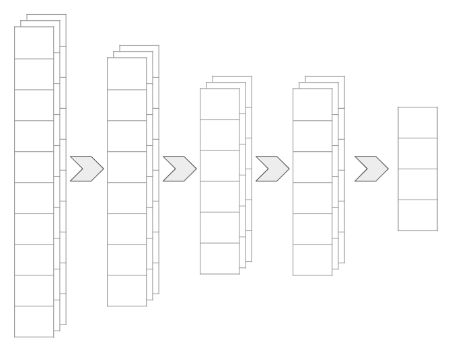
When using a pre-trained model, we typically don’t use its final classification layer.

  • Problem: Final layers usually flatten data into class-specific vectors.
  • Solution: Use an intermediate high-dimensional layer as the output from the pre-trained model.
  • Benefit: Provides rich feature representations for the new custom layers.
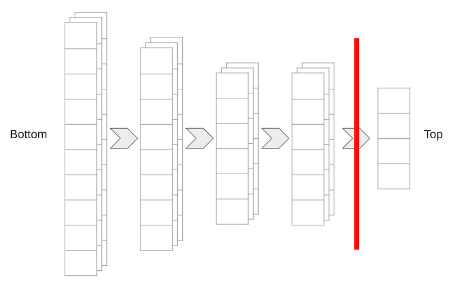
Model Terminology: “Bottom” and “Top”

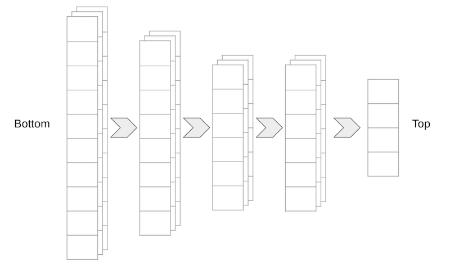
Understanding these terms helps when configuring pre-trained models.

  • “Bottom”: Refers to the input layers of the model.
  • “Top”: Refers to the output layers of the model.

This convention often comes from how models are diagrammed, with input at the bottom and output at the top.
include_top: A Key Parameter

Many pre-trained models (e.g., in Keras) offer an include_top parameter.

  • include_top=True (default): Includes the original classification layers.
  • include_top=False: Excludes the original classification layers.
    • Benefit: Provides a high-dimensional feature extractor.
    • Use Case: Ideal for building custom classifiers on top.

Your Turn!

Now, let’s put transfer learning into practice.

You will use MobileNetV2, a powerful pre-trained model,
to build a network capable of classifying cats and dogs.

What advantages do you expect from using MobileNetV2 compared to training from scratch for this task?