6.2 Basic Filtering Types and Digital Filter Realizations
Digital Signal Processing
6.5 Basic Types of Filtering – Intuition
Filters answer one big question: > Which frequency components do we want to keep, and which do we want to suppress?
Four basic types:
Lowpass – keep low frequencies, remove high frequencies.Highpass – keep high frequencies, remove low frequencies.Bandpass – keep a band of middle frequencies.Bandstop / Notch – remove a band of frequencies, keep the rest.
Real‑world ECE analogy:
Lowpass: Anti‑alias filter before ADC in a sensor interface.
Highpass: AC‑coupling in audio to remove DC offsets.
Bandpass: Channel selection in a communication receiver.
Bandstop / Notch: Removing 50/60 Hz hum in bio‑signals (ECG, EEG).
Use simple analogies:
Think of a graphic equalizer on a music player: each slider roughly corresponds to a bandpass or shelving filter.
In wireless, each received “channel” is obtained by a bandpass filter.
In ECG, power‑line interference is a very narrow spike at 50/60 Hz: perfect for a notch.
Idealized Magnitude Response Concepts
Key regions of a filter’s magnitude response:
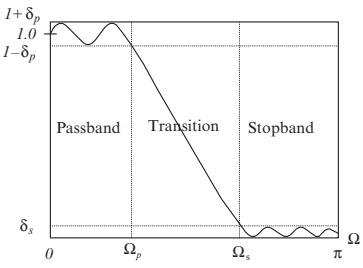
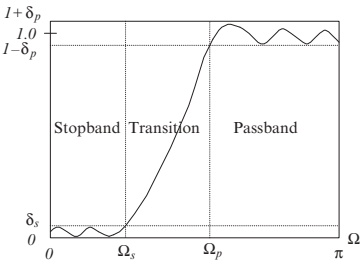
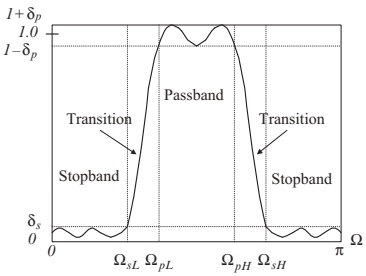
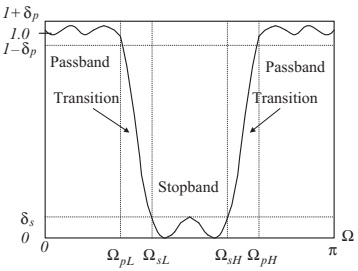
Passband : frequency range where \(|H(e^{j\Omega})| \approx 1\) .Stopband : frequency range where \(|H(e^{j\Omega})|\) is very small (strong attenuation).Transition band : frequency range between passband and stopband where the response “rolls off”.
Design parameters:
\(\Omega_p\) : passband edge frequency.\(\Omega_s\) : stopband edge frequency.\(\delta_p\) : maximum allowed passband ripple .\(\delta_s\) : maximum allowed stopband ripple (or minimum attenuation).
In design specifications, you often see something like:
Passband ripple \(\le 1\) dB (\(\delta_p\) )
Stopband attenuation \(\ge 40\) dB (\(\delta_s\) )
\(\Omega_p = 0.4\pi\) , \(\Omega_s = 0.5\pi\) (normalized radians/sample)
Stress that “ideal brick‑wall” filters are not realizable as finite‑order LTI systems; real filters are approximations that respect these specifications.
Discuss normalized frequency: \(\Omega\) typically normalized by sampling rate so that \(\Omega \in [0,\pi]\) .
Lowpass Filter – Magnitude Response
Normalized Lowpass Filter
Passes low frequencies: \(0 \le \Omega \le \Omega_p\) .
Attenuates high frequencies: \(\Omega \ge \Omega_s\) .
Has a transition band between \(\Omega_p\) and \(\Omega_s\) .
Passband ripple \(\delta_p\) , stopband ripple \(\delta_s\) .
Typical ECE uses:
Anti‑aliasing in sensor front‑ends (analog + digital).
Smoothing / noise reduction in data (e.g., temperature, acceleration).
Audio low‑frequency emphasis (bass boost as part of a more complex chain).
Key design trade‑offs:
Steeper transition band requires higher order filters.
Tighter stopband attenuation also increases order.
Point out on the plot where \(\Omega_p\) , \(\Omega_s\) , \(\delta_p\) , and \(\delta_s\) are. Ask students: “What happens if I want my transition band to be extremely small?” Answer: filter order (and computational complexity) explodes.
Highpass Filter – Magnitude Response
Normalized Highpass Filter
Passes high frequencies.
Attenuates low frequencies.
Typical ECE uses:
Remove slow drift / DC offset from sensor signals.
e.g., accelerometers measuring vibration but not constant gravity.
In speech: emphasize high‑frequency content (e.g., preemphasis).
Communication receivers: sometimes used after down‑conversion to remove image or DC component.
Note: A preemphasis filter in speech (later) is essentially a highpass filter.
Highlight how flipping a lowpass spec in frequency can give a highpass spec (lowpass ↔︎ highpass transformations).
Ask: “If I have a lowpass spec, how might I convert it into a highpass design problem in practice?” (Frequency transformations / spectral inversion).
Bandpass Filter – Magnitude Response
Normalized Bandpass Filter
Passes a frequency band: \(\Omega_{pL} \le \Omega \le \Omega_{pH}\) .
Attenuates frequencies below \(\Omega_{sL}\) and above \(\Omega_{sH}\) .
Two transition bands: low side and high side.
Parameters:
\(\Omega_{pL}\) , \(\Omega_{pH}\) : lower/upper passband edges.\(\Omega_{sL}\) , \(\Omega_{sH}\) : lower/upper stopband edges.\(\delta_p\) , \(\delta_s\) : ripple tolerances.
Typical ECE uses:
Channel selection in RF or IF stages.Formant extraction and band‑limited features in speech.Audio equalizer bands (e.g., “midrange” band).
Vibration analysis: isolating mechanical resonance bands.
Use this to bridge later to the speech bandpass example: the voice band region we will isolate (1000–1400 Hz) is exactly one of these passbands.
Bandstop / Notch Filter – Magnitude Response
Normalized Bandstop Filter
Rejects a band of middle frequencies.
Passes low and high frequencies.
Special case:
Notch filter = very narrow bandstop filter.
Typical ECE uses:
Power‑line interference removal at 50/60 Hz in ECG, EEG, EMG.Removal of a known interference tone in communication systems.
Audio hum removal.
Design challenge:
Very narrow notch ⇒ high Q ⇒ sensitive to coefficient quantization.
Implementation choice (structure) matters for numerical stability.
Mention that the ECG example later uses a second‑order notch at 60 Hz with sampling at 500 Hz.
If time allows, ask: “What happens if the power‑line frequency drifts slightly, but your notch is fixed?” That motivates adaptive notch filters.
From Transfer Function to Frequency Response
To analyze a digital filter, we often start from its transfer function :
\[
H(z) = \frac{B(z)}{A(z)} = \frac{b_0 + b_1 z^{-1} + \dots + b_M z^{-M}}{1 + a_1 z^{-1} + \dots + a_N z^{-N}}.
\]
We want:
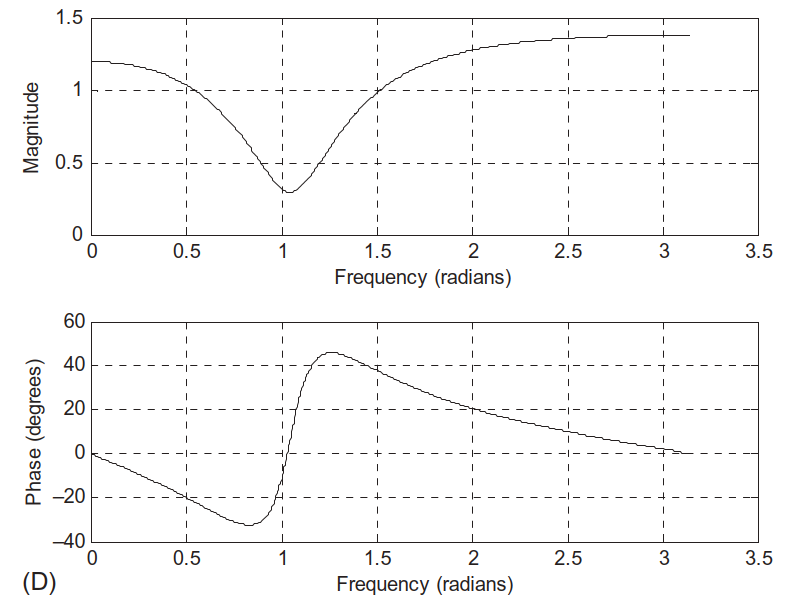
Magnitude response: \(|H(e^{j\Omega})|\) .
Phase response: \(\angle H(e^{j\Omega})\) .
MATLAB tool: freqz()
B – vector of numerator coefficients \([b_0 \; b_1 \; \dots \; b_M]\) .A – vector of denominator coefficients \([1 \; a_1 \; \dots \; a_N]\) .N – number of frequency samples between \(0\) and \(\pi\) .h – complex frequency response at each w.w – corresponding frequency samples in radians/sample.
To plot magnitude and phase :
h , w ] = freqz (B , A , 1024 ); mag = abs (h ); phi = unwrap (angle (h ))* 180 / pi ; subplot (2 , 1 , 1 ); plot (w , mag ); grid ; subplot (2 , 1 , 2 ); plot (w , phi ); grid ;
Important: freqz expects coefficients in delay form (negative powers of \(z\) ).
If a transfer function is given in positive powers of \(z\) , we must rewrite it with \(z^{-1}\) terms before passing coefficients to freqz. That’s exactly what Example 6.12 did.
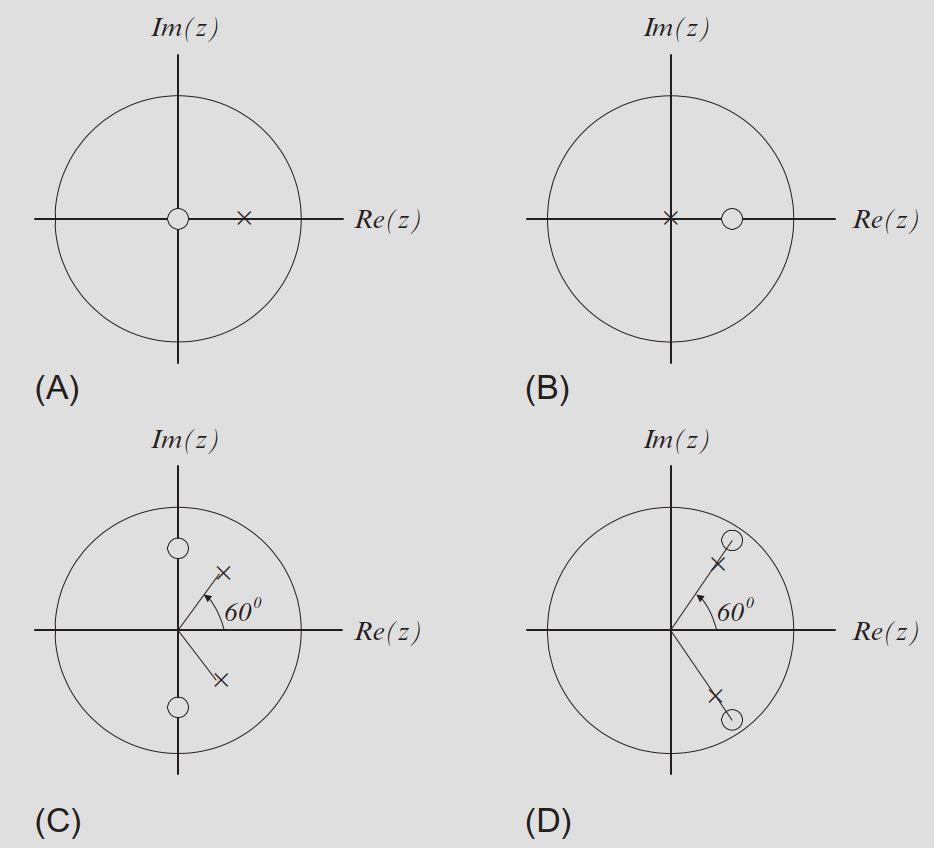
Pole–zero plots are shown in Fig. 6.20:
Example 6.12 – MATLAB Code Structure
The textbook Program 6.2 (cleaned up and corrected) looks like:
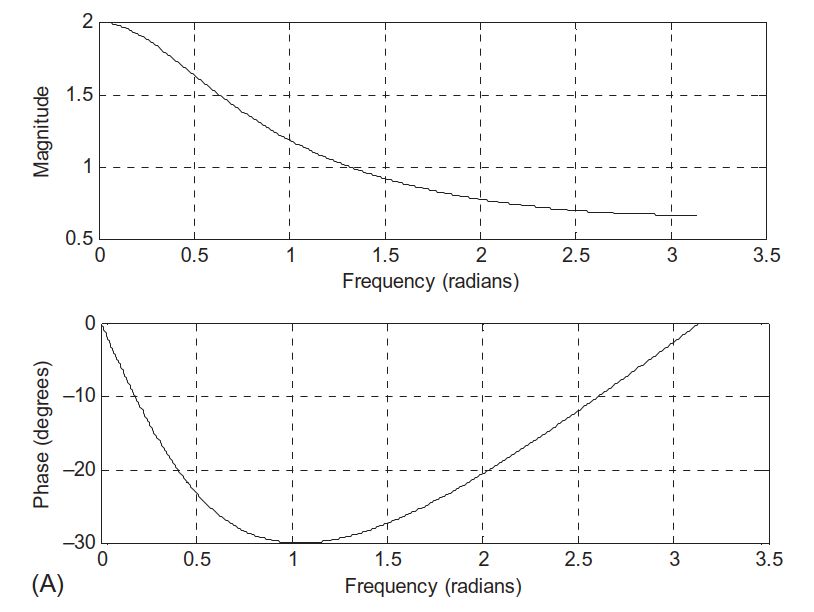
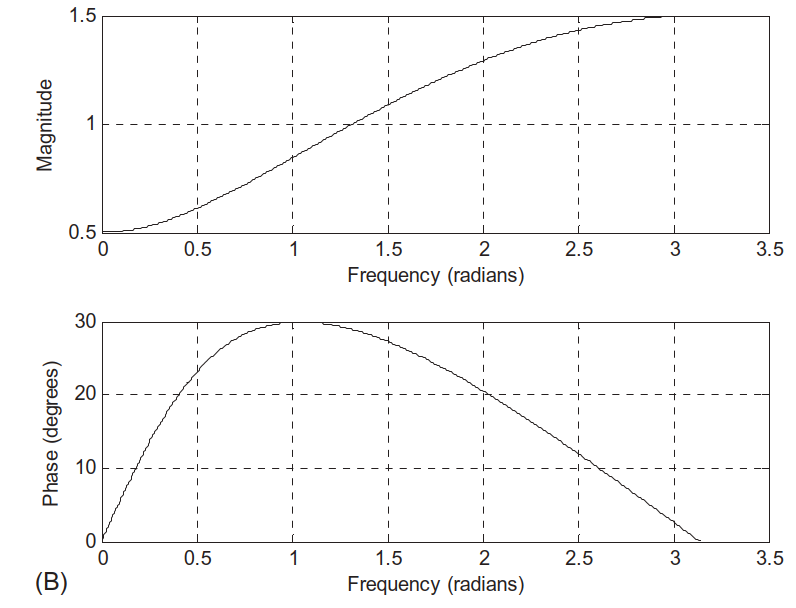
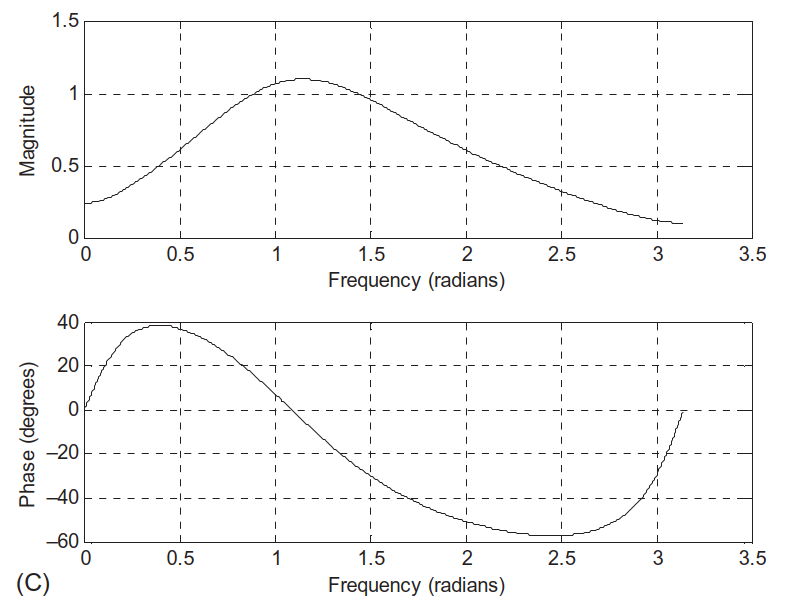
% Example 6.12 N = 1024 ; % Case (a) B = [1 ]; A = [1 - 0.5 ]; h , w ] = freqz (B , A , N ); phi = 180 * unwrap (angle (h ))/ pi ; figure (1 ); subplot (2 , 1 , 1 ); plot (w , abs (h )); grid ; xlabel ('Frequency (rad/sample)' ); ylabel ('Magnitude' ); title ('Case (a)' ); subplot (2 , 1 , 2 ); plot (w , phi ); grid ; xlabel ('Frequency (rad/sample)' ); ylabel ('Phase (degrees)' ); % Case (b) B = [1 - 0.5 ]; A = [1 ]; h , w ] = freqz (B , A , N ); % ... (similar plotting)
Magnitude + phase plots for each case are shown in Figs. 6.21(a–d).
Mention that the code fragment in the book has variable naming inconsistencies ([hw]=freqz but later uses h, w). Show corrected version and encourage students to always check dimensions and variable names in MATLAB.
6.6 Realization of Digital Filters – Big Picture
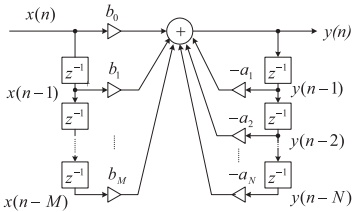
Given a transfer function
\[
H(z) = \frac{B(z)}{A(z)} = \frac{b_0 + b_1 z^{-1} + \dots + b_M z^{-M}}{1 + a_1 z^{-1} + \dots + a_N z^{-N}},
\]
we can implement it in several equivalent ways:
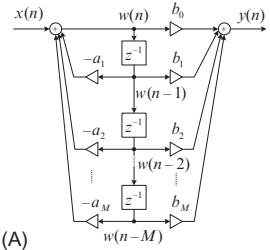
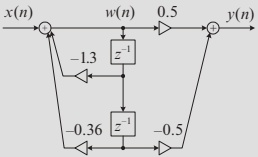
Direct‑Form I Direct‑Form II Cascade (Series) of first/second‑order sectionsParallel sum of first/second‑order sections
All realize the same \(H(z)\) (ideally), but differ in:
Memory (delay elements) required.
Numerical behavior (sensitivity to coefficient quantization, overflow).
Hardware mapping (e.g., how many multipliers/adders).
Emphasize that in real embedded DSP (fixed‑point), the structure matters as much as the polynomial. Many DSP libraries provide second‑order section (SOS) implementations by default.
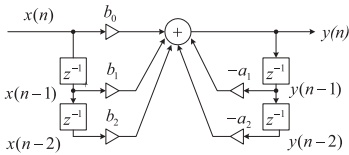
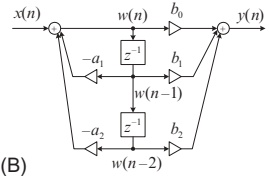
Direct‑Form I structure implements these two parts in parallel , then sums them.
Second‑order example (M = N = 2):
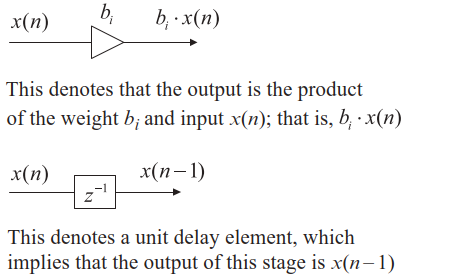
Explain diagram components:
\(z^{-1}\) = one‑sample delay.Multipliers labelled \(b_i\) , \(a_j\) .
Adders summing contributions.
Point out that if some \(a_j\) or \(b_i\) are zero, we simply remove those branches.
Corresponding difference equations:
Direct‑Form II uses fewer delay elements than Direct‑Form I (roughly half when \(M = N\) ), which can save memory and hardware.
Explain conceptually: Direct‑Form II “shares” the delay line between feedforward and feedback parts by working on an internal state \(w(n)\) rather than raw \(x(n)\) and \(y(n)\) .
Also stress: Direct‑Form II can be more sensitive to coefficient quantization in high‑order filters → reason to use second‑order sections in cascade instead.
Cascade (Series) Realization – Concept
Factor \(H(z)\) into first‑ and second‑order sections :
\[
H(z) = H_1(z) H_2(z) \cdots H_K(z).
\]
Each section \(H_k(z)\) is usually:
First order: \[
H_k(z) = \frac{b_{k0} + b_{k1} z^{-1}}{1 + a_{k1} z^{-1}}
\]
Or second order: \[
H_k(z) = \frac{b_{k0} + b_{k1} z^{-1} + b_{k2} z^{-2}}{1 + a_{k1} z^{-1} + a_{k2} z^{-2}}
\]
Block diagram:
In practice, high‑order IIR filters are almost always implemented as a cascade of biquads (second‑order sections), each realized by Direct‑Form II (or other numerically robust forms like lattices).
Benefits:
Better numerical conditioning: errors are “spread out” over sections.
Poles/zeros can be paired in sections for optimal stability and dynamic range.
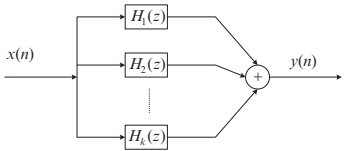
Parallel Realization – Concept
Express \(H(z)\) as a sum of sections :
\[
H(z) = H_1(z) + H_2(z) + \dots + H_K(z).
\]
Typically using partial fraction expansion:
Parallel form is particularly convenient when:
Using partial fraction expansion of rational functions.
Certain sections correspond to specific spectral features you want to modify independently (e.g., adjustable resonances or notches).
However, cascade is more common in standard IIR filter libraries.
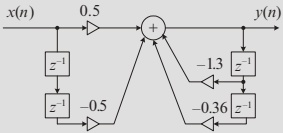
Example 6.13 – Cascade via First‑Order Sections
Factor \(H(z)\) into two first‑order sections:
\[
\begin{aligned}
H(z) &= \frac{0.5(1 - z^{-2})}{1 + 1.3 z^{-1} + 0.36 z^{-2}} \\
&= \frac{0.5 - 0.5 z^{-1}}{1 + 0.4 z^{-1}} \cdot \frac{1 + z^{-1}}{1 + 0.9 z^{-1}} \\
&= H_1(z) \cdot H_2(z),
\end{aligned}
\]
with one possible choice:
\(H_1(z) = \dfrac{0.5 - 0.5 z^{-1}}{1 + 0.4 z^{-1}}\) \(H_2(z) = \dfrac{1 + z^{-1}}{1 + 0.9 z^{-1}}\)
(Other factorizations are possible; this is not unique .)
Cascade structure using Direct‑Form II in each section:
Explain that we treat each \(H_k(z)\) as a small filter block (biquad or first order), and the full filter is their series connection.
Engineering practice: Implementation libraries (like MATLAB’s sosfilt) take coefficient matrices where each row is one second‑order section.
Example 6.13 – Cascade Difference Equations
Let \(x(n)\) → Section 1 → intermediate \(y_1(n)\) → Section 2 → final \(y(n)\) .
Section 1 (\(H_1(z)\) ):
\[
\begin{aligned}
w_1(n) &= x(n) - 0.4 w_1(n-1) \\
y_1(n) &= 0.5 w_1(n) - 0.5 w_1(n-1)
\end{aligned}
\]
Section 2 (\(H_2(z)\) ):
\[
\begin{aligned}
w_2(n) &= y_1(n) - 0.9 w_2(n-1) \\
y(n) &= w_2(n) + w_2(n-1)
\end{aligned}
\]
Explain variable naming: \(w_1, w_2\) are internal states in each section; \(y_1\) is the internal signal between them.
Ask: Could we swap \(H_1\) and \(H_2\) ? Yes; the cascade of LTI systems commutes, though numerical properties may differ in finite precision.
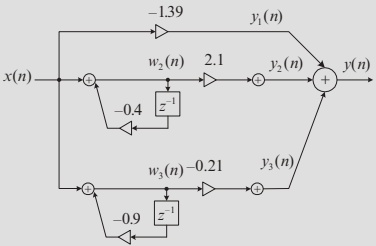
Example 6.13 – Parallel via First‑Order Sections
Use partial fraction expansion . Start by writing:
\[
\frac{H(z)}{z} = \frac{0.5(z^2 - 1)}{z(z + 0.4)(z + 0.9)}
= \frac{A}{z} + \frac{B}{z + 0.4} + \frac{C}{z + 0.9}.
\]
Solving for \(A, B, C\) (as in the text):
\(A = -1.39\) \(B = 2.1\) \(C = -0.21\)
So:
\[
\begin{aligned}
H(z) &= -1.39 + \frac{2.1 z}{z + 0.4} - \frac{0.21 z}{z + 0.9} \\
&= -1.39 + \frac{2.1}{1 + 0.4 z^{-1}} + \frac{-0.21}{1 + 0.9 z^{-1}}.
\end{aligned}
\]
Parallel structure: three sections in parallel, summed at the output.
Note that the constant term \(-1.39\) can be seen as a “zero order” section: just a gain on \(x(n)\) .
Parallel form expresses \(H(z)\) as a sum of simpler modes (like resonances). This can be useful in spectral modeling and for adjustable parametric equalizers.
6.7.1 Speech Preemphasis – Motivation
Speech spectra typically have more energy at low frequencies and less at high frequencies.
In some applications (e.g., speech coding, recognition):
Important phonetic information exists at higher frequencies .
We don’t want encoder/feature extractor to overlook that content.
Solution:
Preemphasis filter – roughly a highpass filter that boosts high frequencies and slightly attenuates low ones.
Simple digital preemphasis filter:
\[
y(n) = x(n) - \alpha x(n-1), \quad 0 < \alpha < 1.
\]
Transfer function:
\[
H(z) = 1 - \alpha z^{-1}.
\]
One zero at \(z = \alpha\) (inside unit circle, close to DC).
Magnitude increases with frequency → highpass behavior.
Emphasize how simple this is: just one subtract and one multiply per sample. Good for hardware or real‑time embedded implementation.
Typically \(\alpha\) between 0.9 and 0.97 in many speech processing systems.
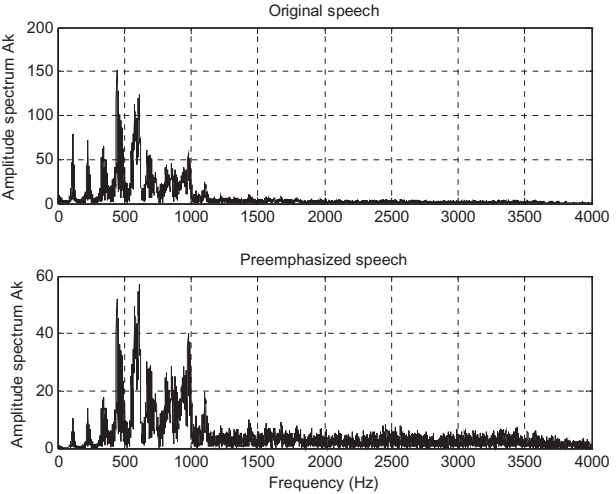
Preemphasis Filter – Frequency Response & Effect
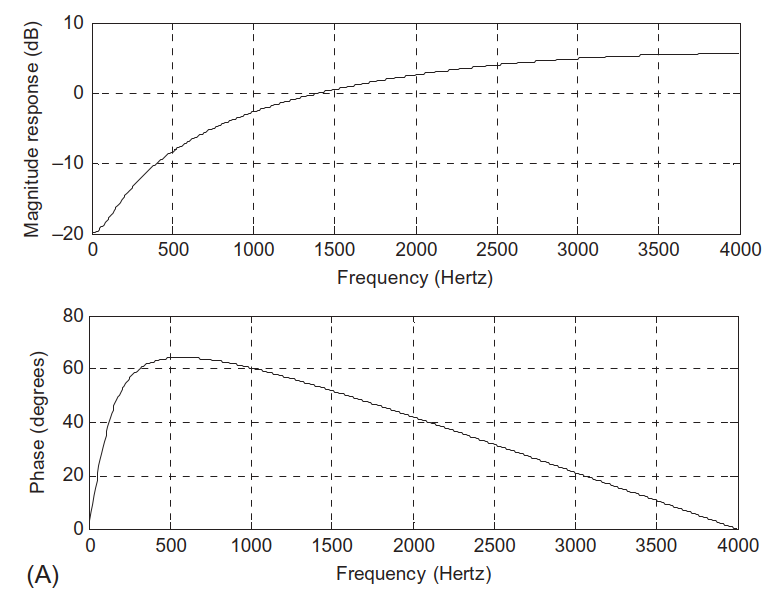
For \(\alpha = 0.9\) , \(f_s = 8000\) Hz:
Use freqz([1 -alpha], 1, 512, fs) to plot frequency response.
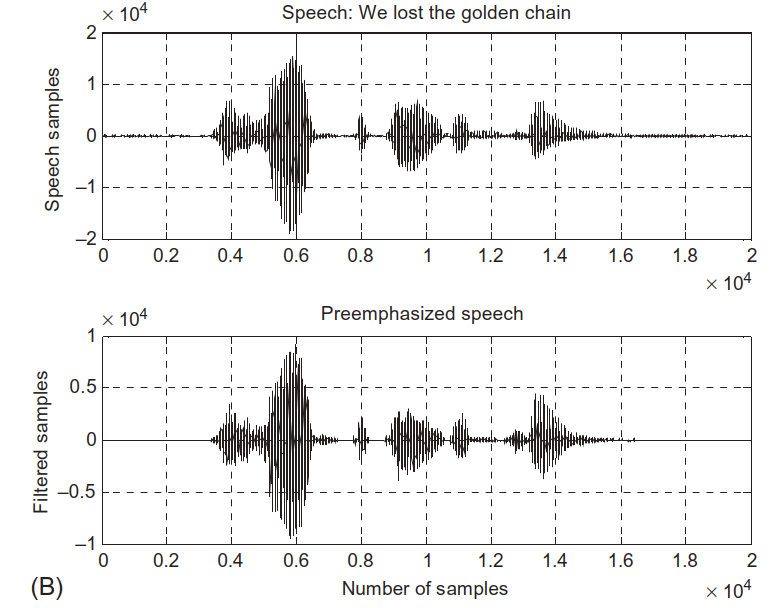
Effect on speech waveform:
Spectra comparison (FFT + Hamming window):
Observation:
High‑frequency components are boosted.
Low‑frequency components are relatively attenuated.
Explain that the filter is linear phase (for this single zero it’s not symmetrical FIR, but phase is still well‑behaved for narrowband speech).
Explain briefly the use of windowing (Hamming) in spectrum estimation to reduce leakage.
MATLAB Program 6.3 – Preemphasis Implementation
% Program 6.3: Preemphasis of speech close all ; clear all fs = 8000 ; % Sampling rate alpha = 0.9 ; % Degree of pre-emphasis % Frequency response figure (1 ); freqz ([1 - alpha ], 1 , 512 , fs ); % Load speech signal load speech .dat % Vector 'speech' % Apply preemphasis filter y = filter ([1 - alpha ], 1 , speech ); % Time-domain plots figure (2 ); subplot (2 , 1 , 1 ); plot (speech ); grid ; ylabel ('Speech samples' ); title ('Original speech' ); subplot (2 , 1 , 2 ); plot (y ); grid ; ylabel ('Filtered samples' ); xlabel ('Sample index' ); title ('Preemphasized speech' ); % Spectral analysis figure (3 ); N = length (speech ); Axk = abs (fft (speech .* hamming (N ))) / N ; Ayk = abs (fft (y .* hamming (N ))) / N ; f = (0 : N / 2 )* fs / N ; Axk (2 : N ) = 2 * Axk (2 : N ); Ayk (2 : N ) = 2 * Ayk (2 : N ); subplot (2 , 1 , 1 ); plot (f , Axk (1 : N / 2 + 1 )); grid ; ylabel ('Amplitude spectrum' ); title ('Original speech' ); subplot (2 , 1 , 2 ); plot (f , Ayk (1 : N / 2 + 1 )); grid ; ylabel ('Amplitude spectrum' ); xlabel ('Frequency (Hz)' ); title ('Preemphasized speech' );
Point out how similar this is to the earlier freqz() example.
Ask students: “If I change alpha to 0.5 or 0.99, how will the spectrum look different?” Encourage them to try this as a quick lab exercise.
6.7.2 Bandpass Filtering of Speech – Setup
Goal: isolate a narrow band of speech frequencies for analysis or feature extraction.
Given a 4th‑order digital Bandpass Butterworth filter:
Sampling rate: \(f_s = 8000\) Hz.
Lower cutoff: 1000 Hz.
Upper cutoff: 1400 Hz.
Bandwidth: 400 Hz.
Transfer function:
\[
H(z) = \frac{0.0201 - 0.0402 z^{-2} + 0.0201 z^{-4}}{1 - 2.1192 z^{-1} + 2.6952 z^{-2} - 1.6924 z^{-3} + 0.6414 z^{-4}}.
\]
Difference equation:
\[
\begin{aligned}
y(n) &= 0.0201 x(n) - 0.0402 x(n-2) + 0.0201 x(n-4) \\
&\quad + 2.1192 y(n-1) - 2.6952 y(n-2) \\
&\quad + 1.6924 y(n-3) - 0.6414 y(n-4).
\end{aligned}
\]
Highlight that this is a 4th‑order IIR filter ; typical to implement as two cascaded biquads in practice (though here given monolithically).
Butterworth ⇒ maximally flat passband (no ripple).
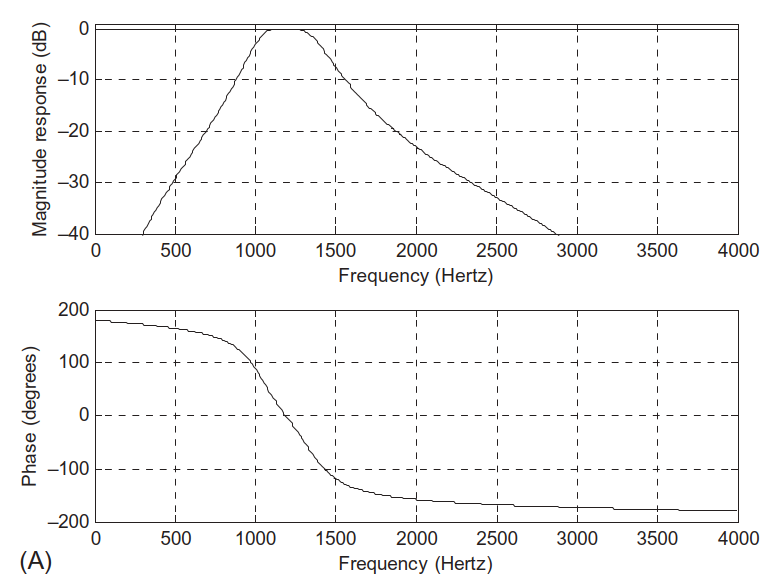
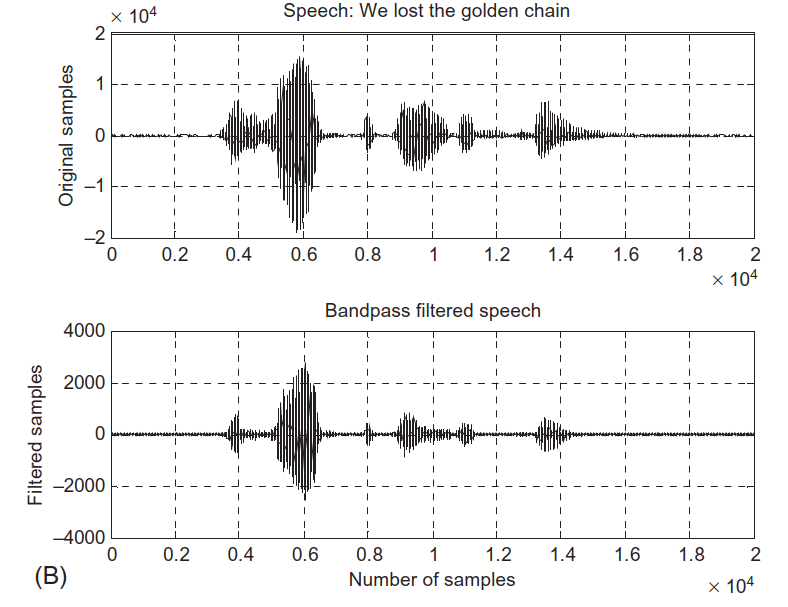
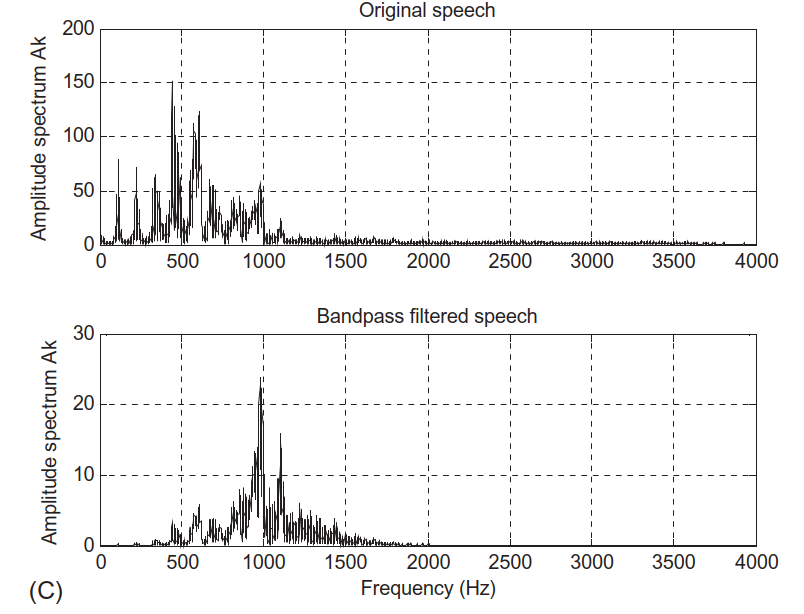
Bandpass Filter – Frequency Response and Effect
Frequency response via freqz:
Time‑domain speech before and after filtering:
Observation:
Frequencies below 1000 Hz and above 1400 Hz are significantly attenuated.
Passband 1000–1400 Hz remains.
Point out that many speech formants (resonant frequencies) lie in certain bands. A bandpass filter can isolate these for pitch or formant analysis.
Ask: “What type of content (e.g., vowel vs consonant) might be emphasized in this band?” This can lead to a discussion of formants.
MATLAB Program 6.4 – Bandpass Filter Implementation
% Program 6.4: Bandpass filtering of speech fs = 8000 ; % Sampling rate % Bandpass filter coefficients (4th-order) B = [0.0201 0 - 0.0402 0 0.0201 ]; A = [1 - 2.1192 2.6952 - 1.6924 0.6414 ]; % Frequency response figure (1 ); freqz (B , A , 512 , fs ); axis ([0 fs / 2 - 40 1 ]); % Adjust axis if needed % Load speech load speech .dat % Filter speech y = filter (B , A , speech ); % Time-domain plots figure (2 ); subplot (2 , 1 , 1 ); plot (speech ); grid ; ylabel ('Original Samples' ); title ('Original speech' ); subplot (2 , 1 , 2 ); plot (y ); grid ; xlabel ('Sample index' ); ylabel ('Filtered Samples' ); title ('Bandpass filtered speech.' ); % Spectral analysis figure (3 ); N = length (speech ); Axk = abs (fft (speech .* hamming (N )))/ N ; Ayk = abs (fft (y .* hamming (N )))/ N ; f = (0 : N / 2 )* fs / N ; Axk (2 : N ) = 2 * Axk (2 : N ); Ayk (2 : N ) = 2 * Ayk (2 : N ); subplot (2 , 1 , 1 ); plot (f , Axk (1 : N / 2 + 1 )); grid ; ylabel ('Amplitude spectrum' ); title ('Original speech' ); subplot (2 , 1 , 2 ); plot (f , Ayk (1 : N / 2 + 1 )); grid ; ylabel ('Amplitude spectrum' ); xlabel ('Frequency (Hz)' ); title ('Bandpass filtered speech' );
Encourage students to experiment by changing cutoff frequencies (design new IIR filters using butter or cheby1), and observe how voice quality changes.
This also connects strongly to audio equalization and communication channel filtering.
6.7.3 ECG Enhancement with Notch Filter
Problem: ECG signal contaminated by 60 Hz power‑line interference during acquisition.
Given:
Sampling frequency: \(f_s = 500\) Hz.
Target: Notch at 60 Hz.
Designed second‑order notch filter:
\[
H(z) = \frac{1 - 1.4579 z^{-1} + z^{-2}}{1 - 1.3850 z^{-1} + 0.9025 z^{-2}}.
\]
Difference equation:
\[
y(n) = x(n) - 1.4579 x(n-1) + x(n-2) + 1.3850 y(n-1) - 0.9025 y(n-2).
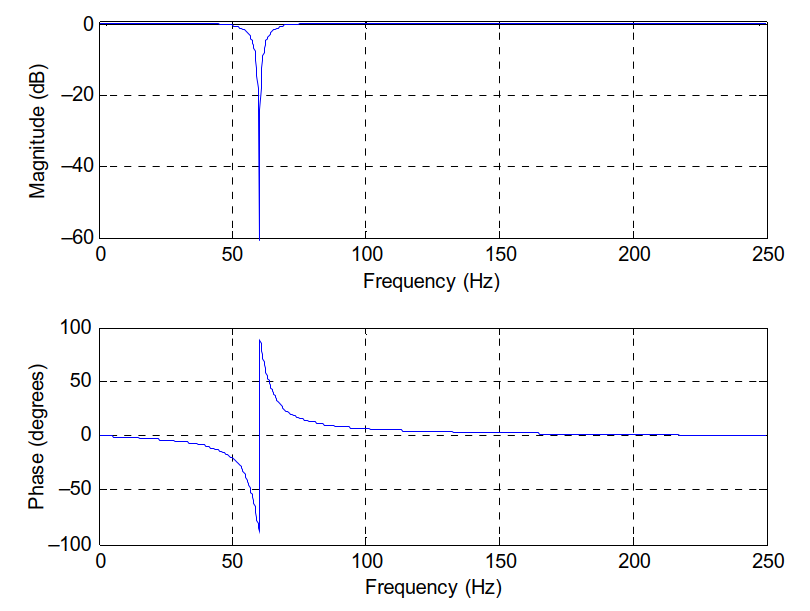
\]
Frequency response:
Explain that the numerator zeros are placed exactly at the normalized frequency of 60 Hz (and its conjugate), and poles are placed slightly inside the unit circle at almost the same angle, forming a narrow notch.
Normalized notch angle: \(\Omega_0 = 2\pi \cdot 60 / 500\) .
ECG Before and After Notch Filtering
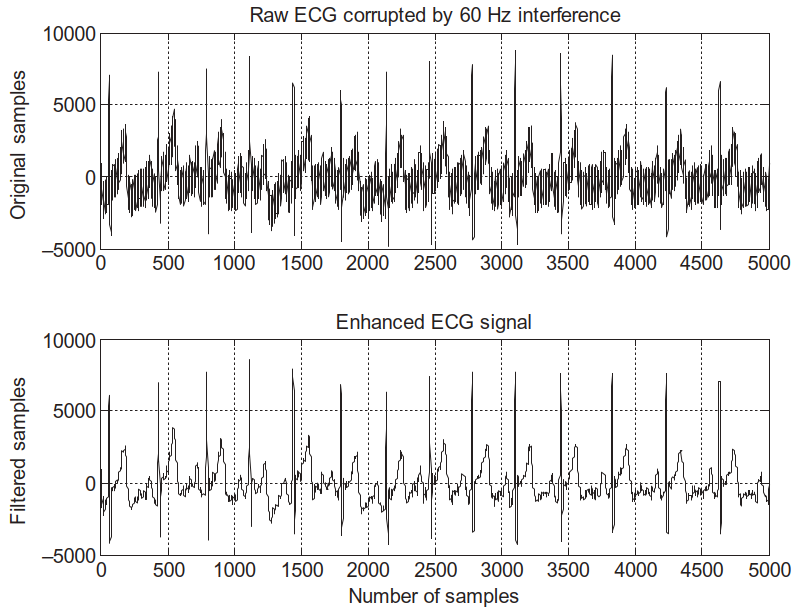
Time‑domain ECG:
Upper plot: ECG + 60 Hz interference.
Lower plot: Filtered ECG with notch filter applied.
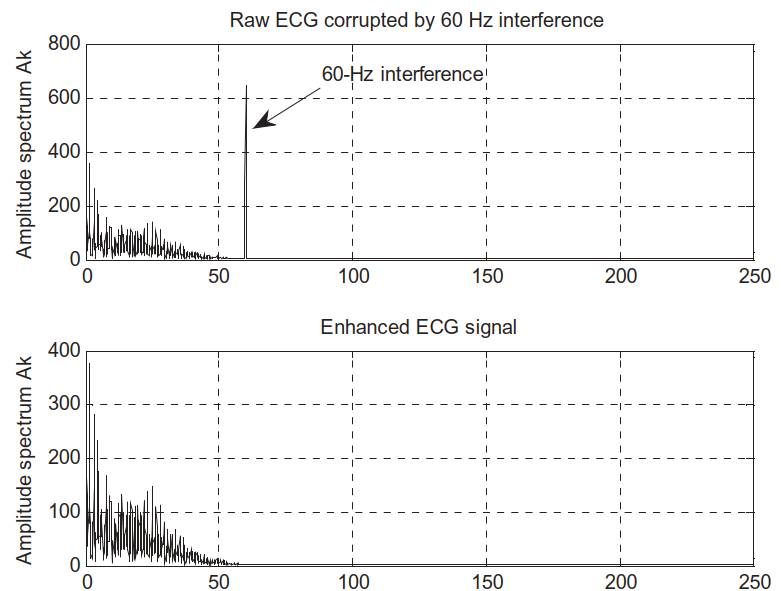
Frequency‑domain view:
Clear peak at 60 Hz in corrupted signal.
Peak eliminated in enhanced signal; baseline ECG spectrum preserved.
This is a classic and practical example of DSP in biomedical engineering: a simple, well‑designed digital notch filter significantly improves diagnostic signal quality.
Remind students that in real medical devices, you must preserve morphology of ECG (P‑QRS‑T complex). Too aggressive filtering could distort clinical features.
Thus, filter design balances interference suppression with signal fidelity.
Summary / Key Points
Four basic digital filter types:
Lowpass – passes low frequencies, attenuates high.Highpass – passes high, attenuates low.Bandpass – passes a band, attenuates outside.Bandstop / Notch – attenuates a band, passes outside.
Filter specs defined by:
Passband / stopband edges (\(\Omega_p\) , \(\Omega_s\) , etc.).
Passband ripple \(\delta_p\) , stopband ripple \(\delta_s\) .
freqz(B, A, N) computes complex frequency response of \(H(z) = B(z)/A(z)\) .
Realizations of IIR filters:
Direct‑Form I – two parallel paths (input and output delays).Direct‑Form II – minimal delays via shared internal state.Cascade – product of first/second‑order sections (common for high orders).Parallel – sum of elementary sections via partial fraction expansion.
Real ECE applications:
Preemphasis of speech – simple highpass FIR filter \(H(z) = 1 - \alpha z^{-1}\) .Bandpass speech filter – 4th‑order IIR to isolate 1000–1400 Hz band.ECG enhancement – narrow notch at 60 Hz to remove power‑line interference.
Encourage students to revisit these examples when they see any new filter or DSP device: ask, “What type is it? What realization likely used? What application constraints shaped it?”
These patterns repeat across many ECE sub‑disciplines.
Preemphasis filter:
\[
y(n) = x(n) - \alpha x(n-1), \quad H(z) = 1 - \alpha z^{-1}.
\]
Example bandpass IIR difference equation:
\[
\begin{aligned}
y(n) &= 0.0201 x(n) - 0.0402 x(n-2) + 0.0201 x(n-4) \\
&\quad + 2.1192 y(n-1) - 2.6952 y(n-2) \\
&\quad + 1.6924 y(n-3) - 0.6414 y(n-4).
\end{aligned}
\]
Example ECG notch filter:
\[
H(z) = \frac{1 - 1.4579 z^{-1} + z^{-2}}{1 - 1.3850 z^{-1} + 0.9025 z^{-2}}
\]
\[
y(n) = x(n) - 1.4579 x(n-1) + x(n-2) + 1.3850 y(n-1) - 0.9025 y(n-2).
\]
Suggest that students create a “formula sheet” including:
General \(H(z)\) forms.
Direct‑Form I & II equations.
Example simple filters (moving average, preemphasis, simple notch).
This will be invaluable in exams and labs.
Interactive: Basic Frequency Response Explorer
Experiment with a simple IIR filter (like Example 6.12).
Try:
B = [1.0], A = [1.0, -0.5] (Example 6.12(a): lowpass).B = [1.0, -0.5], A = [1.0] (Example 6.12(b): highpass).
Reactive: Identify Filter Type from Coefficients
Use sliders to set a simple 2‑tap FIR filter: \(H(z) = b_0 + b_1 z^{-1}\) . Observe the magnitude response and guess: lowpass or highpass?
= Inputs. range ([- 1 , 1 ], {step : 0.1 , label : "b0 (feedthrough)" })= Inputs. range ([- 1 , 1 ], {step : 0.1 , label : "b1 (one-sample delay)" })
Try:
\(b_0 = 1\) , \(b_1 = -0.9\) → highpass / preemphasis‑like.\(b_0 = 0.5\) , \(b_1 = 0.5\) → lowpass (moving average of length 2).
Interactive: Pole–Zero Plot for Example 6.12
Let’s approximate a pole–zero plot for one of the Example 6.12 filters.
Try replacing B and A with other examples ((a), (b), or (d)) and see how poles and zeros move.
Reactive: Preemphasis Filter \(H(z) = 1 - \alpha z^{-1}\)
Recall:
Preemphasis for speech: \(y(n) = x(n) - \alpha x(n-1)\) , \(0 < \alpha < 1\) .
\(H(z) = 1 - \alpha z^{-1}\) is a simple highpass filter.
Use the slider to change \(\alpha\) and observe the magnitude response.
= Inputs. range ([0 , 0.99 ], {step : 0.01 , label : "Preemphasis α" })
Observe: as \(\alpha\) → 1, the low‑frequency attenuation increases and high‑frequency boost increases.
Interactive: Time‑Domain Preemphasis on Synthetic Signal
Apply preemphasis to a simple synthetic “speech‑like” signal: mixture of low and high frequencies.
Try increasing the amplitude of the high‑frequency component in x and observe how preemphasis modifies the signal.
Reactive: Bandpass Filter – Shape Control
We’ll create a simple FIR bandpass by subtracting a lowpass response from a highpass response. To keep it simple, use two moving-average filters and explore the transition region.
= Inputs. range ([1 , 30 ], {step : 1 , label : "Lowpass MA length (L1)" })= Inputs. range ([1 , 30 ], {step : 1 , label : "Highpass MA length (L2)" })
Change L1 and L2 to see how the passband region and transition widths change.
Reactive: Notch Filter at Variable Frequency
Design a simple second‑order notch :
\[
H(z) = \frac{1 - 2r\cos\Omega_0 z^{-1} + r^2 z^{-2}}{1 - 2\cos\Omega_0 z^{-1} + z^{-2}},
\]
where \(\Omega_0\) is the notch frequency and \(0 < r < 1\) controls the width.
= Inputs. range ([10 , 100 ], {step : 1 , label : "Notch center f0 (Hz)" })= Inputs. range ([0.5 , 0.99 ], {step : 0.01 , label : "Pole radius r" })
Try:
Set f0 = 60 Hz, r ≈ 0.95 (similar to ECG example).
Move f0 around and watch the notch move along the frequency axis.
Interactive: Apply Notch Filter to Synthetic ECG + Noise
Create a synthetic ECG‑like waveform (simplified) plus a sinusoidal interference at f0.
Observe how the oscillatory 60 Hz component is suppressed while the slower ECG‑like shape remains.