Define a control system and recognize common ECE applications.
Distinguish open-loop and closed-loop (feedback) systems.
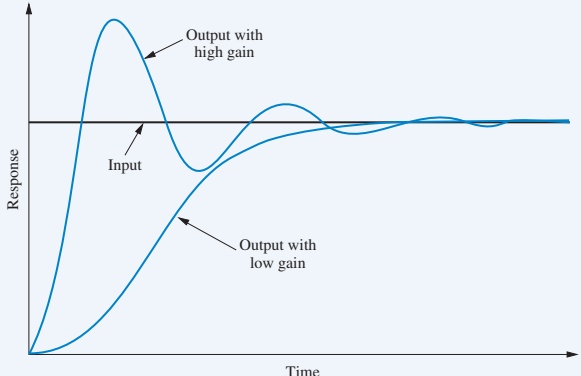
Explain transient response, steady-state error, and stability qualitatively.
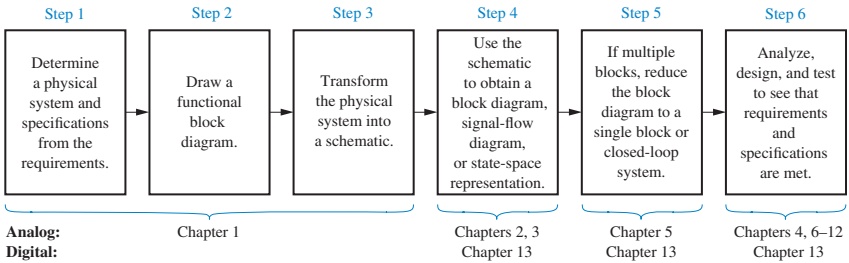
Describe the main steps of the control system design process.
Appreciate the role of computer-aided tools (e.g., MATLAB) in control design.
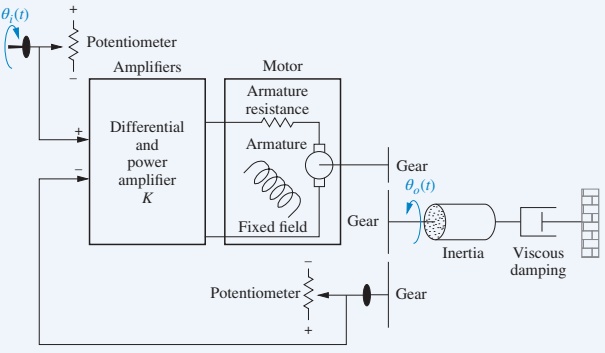
Interpret the antenna-azimuth case study as a canonical position control problem.
Big Picture: What Is a Control System?
A control system is:
A collection of subsystems and processes (the plant) assembled to produce a desired output, with desired performance, in response to a specified input.
Key ingredients:
Input (command / reference) – what we want.
Plant / process – the physical system we influence.
Output – what actually happens.
Controller – logic that decides how to drive the plant.
Optionally: feedback that measures the output.
Everyday Examples (ECE Focus)
Engineering / technology examples
Elevator position and speed control.
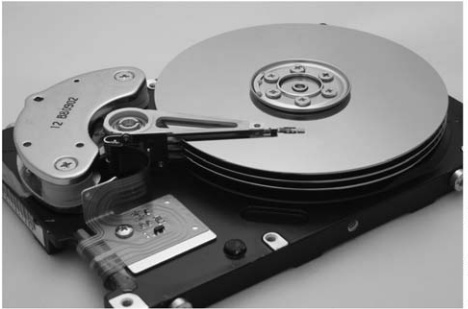
Disk drive head positioning.
Antenna pointing for satellites.
Motor drives in robots and drones.
Power electronics: DC–DC converter voltage regulation.
Communication systems: automatic gain control (AGC).
Natural / “biological” control systems
Blood sugar regulation (pancreas / insulin).
Heart rate and oxygen delivery in “fight or flight.”
Eye tracking to keep moving targets centered on the retina.
Muscle control when you reach and place an object precisely.
Note
Control concepts cut across electrical, mechanical, chemical, biological, and even economic systems.
Case-Study Learning Outcome
We will repeatedly return to a running case study:
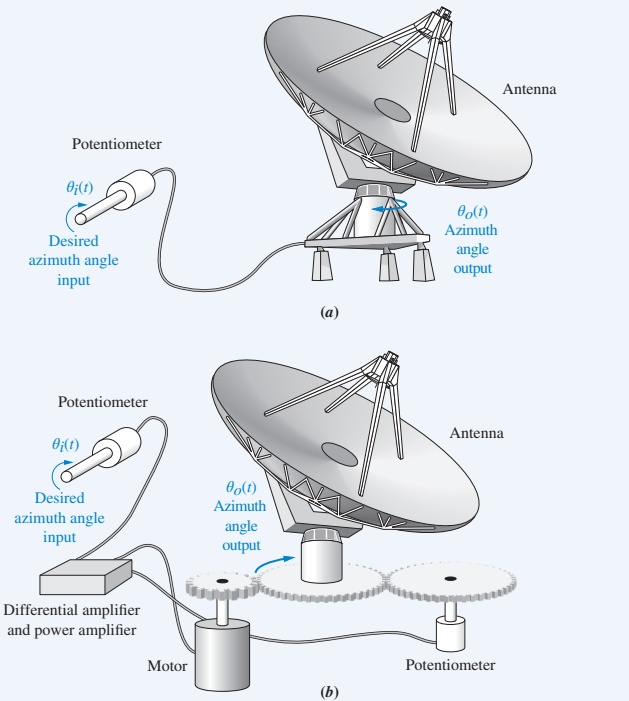
Antenna azimuth position control system
You will use it to:
See how a real electromechanical control loop is built.
Connect physical hardware (motors, sensors, amplifiers) to block diagrams.
Visualize transient response, steady-state error, and stability.
Practice design trade-offs (speed vs. overshoot, accuracy vs. complexity).
1.1 Control Systems All Around Us
Control systems are integral to modern society:
Space shuttle launch and orbit control – rocket thrust, attitude, and trajectory.
CNC machining – precise movement of tools with cooling and speed control.
Automated guided vehicles in factories – follow paths and avoid obstacles.
Natural examples inside your body:
Hormonal control (e.g., insulin) maintains blood sugar.
Adrenaline raises heart rate and breathing when stressed.
Eyes and hands coordinate to track and grasp objects.
Even abstract systems like student performance vs. study time can be modeled as control systems.
Control System Definition & Basic Block Diagram
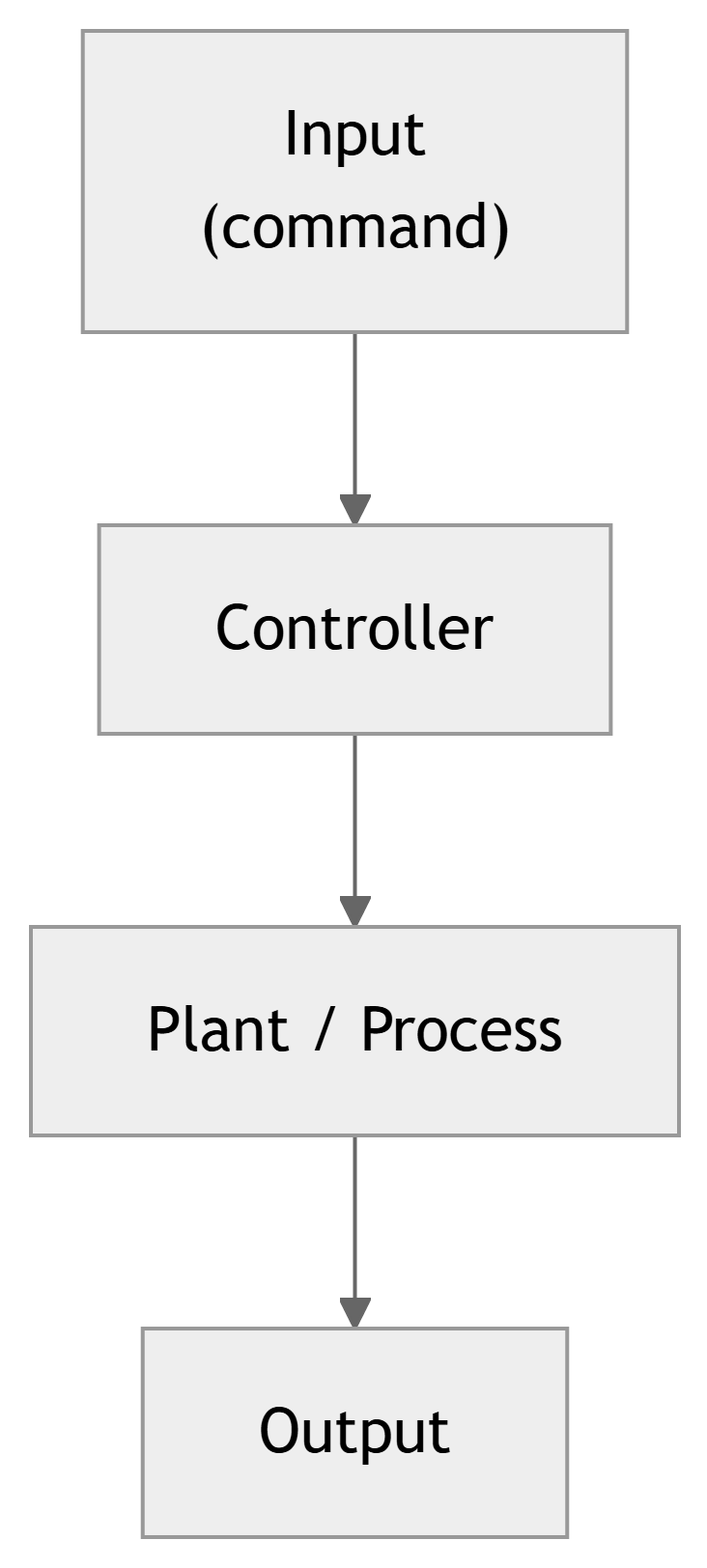
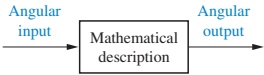
Figure 1.1 Simplified description of a control system
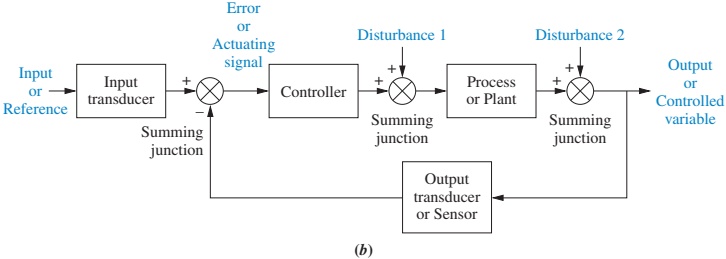
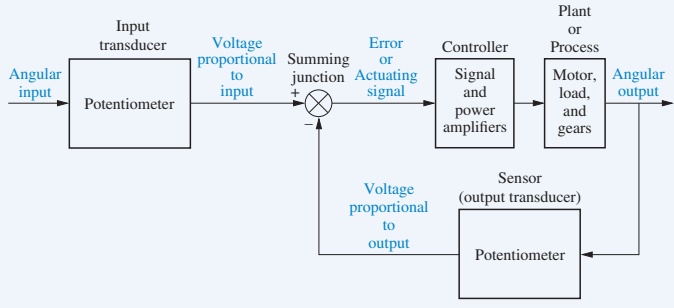
A control system consists of:
Controller – implements the control law.
Plant / process – physical system we’re controlling.
Input – desired plant output (command).
Output – measured plant response.
Elevator Example: Input, Output, Performance
You press the 4th floor button on the 1st floor.
The car should move:
Fast enough (but not scary).
Smoothly, without oscillations.
Stop level with the floor.
Input: “Go to 4th floor” (a step in desired position).
Output: actual car position vs. time.
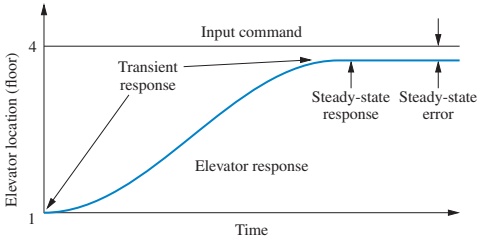
Figure 1.2 Elevator response
Two key performance aspects visible here:
Transient response – how the elevator moves while changing floors.
Steady-state error – how close the final position is to the floor.
Why Use Control Systems?
We build control systems to:
Amplify power – small electrical signals command large mechanical power.
Enable remote control – operate systems from a distance or hazardous area.
Change input form – e.g., a knob position → room temperature.
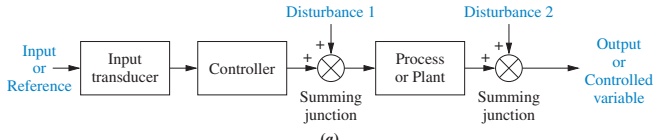
Compensate for disturbances – maintain performance despite wind, load changes, noise, etc.
Disturbances & Compensation: Antenna Example
Example: Antenna pointing system
Goal: keep antenna aimed at a satellite.
Disturbances:
Wind gusts push the antenna off target.
Mechanical friction or backlash.
Electrical noise in sensors/actuators.
A good control system:
Detects deviation from commanded angle.
Applies correction so the antenna returns to the right direction.
Does this automatically; the reference input does not change.
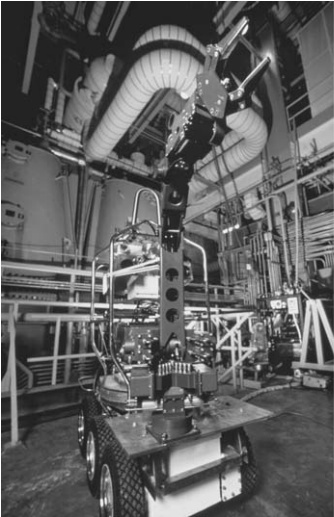
Rover robot arm in contaminated area
1.2 Brief History of Control Systems (Human-Designed)
Control ideas go back over 2000 years:
300 B.C. – Greek water clocks (Ktesibios). Liquid-level regulation to maintain constant flow.
Ancient oil lamps (Philon of Byzantium). Self-regulated oil level by clever tubing and air pressure.
Lyapunov (1892) – generalized stability theory to nonlinear systems.
These works turned practical control problems into mathematical questions about differential equations and their roots.
Tip
In later chapters, you will learn how to decide if a system is stable by looking at coefficients or roots of characteristic equations, not by trial-and-error experiments.
20th-Century Frequency and Root-Locus Methods
Key developments:
Nicholas Minorsky (1920s) – theoretical basis of PID control for ship steering.
Bode & Nyquist (Bell Labs, 1920s–30s) –
Feedback amplifier analysis.
Bode plots and Nyquist criteria for frequency-domain design.
Walter R. Evans (1948) –
Root locus: graphical method to see how closed-loop poles move as a gain changes.
These are the core analysis tools for classical linear control.
Contemporary Applications
Modern control systems are everywhere:
Aerospace – missile and spacecraft guidance, aircraft autopilots, UAVs.
Ships – heading control, roll stabilization, dynamic positioning.
Process industry – temperature, pressure, concentration, flow, and thickness regulation.
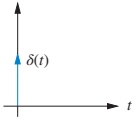
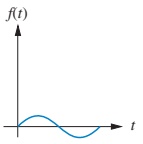
Sinusoid \(\sin \omega t\) → frequency response and modeling.
Interactive Exercise – Step Response Intuition
Use this interactive block to explore how gain affects a second-order system’s step response.
viewof wn = Inputs.range([0.1,10], {step:0.1,value:2,label:"Natural frequency ω_n"})viewof zeta = Inputs.range([0,2], {step:0.05,value:0.4,label:"Damping ratio ζ"})
1.6 Computer-Aided Design (CAD)
Historically:
Control design involved hand calculations and manual plotting.
Large mainframes were needed for complex simulations.
Today:
Desktop/laptop tools like MATLAB + Control System Toolbox, Simulink, LabVIEW, and others allow:
Easy simulation of linear and nonlinear systems.
Rapid “what-if” tuning of parameters.
Automated plotting of time and frequency responses.
Design and optimization of controllers (PID, state feedback, etc.).
Tip
In this course, you should: - First understand the theory and hand calculations. - Then use tools like MATLAB to speed up analysis and explore more complex designs.
1.7 The Control Systems Engineer
A control systems engineer often:
Works at a system level defining and refining requirements.
Break them down into subsystems and detailed designs.
Benefits of studying control systems:
You will see how earlier courses (circuits, signals, mechanics, programming) fit into a unified system design process.
You learn a common language that bridges different engineering domains.
Summary / Key Points
A control system regulates a plant’s output to follow a desired input, often in the presence of disturbances.
Control systems are everywhere: elevators, antennas, disk drives, robots, power converters, biological systems, and more.
There are two main architectures:
Open-loop – simple but cannot correct for disturbances.
Closed-loop (feedback) – uses output measurement to reduce error and improve robustness.
Core performance objectives:
Desired transient response.
Small steady-state error.
Guaranteed stability.
Summary / Key Points
The design process follows an ordered sequence: from requirements → physical concept → functional diagram → schematic → mathematical model → analysis and design.
Computer tools (MATLAB, Simulink, LabVIEW, etc.) are essential, but must be used with understanding.
The antenna azimuth position control system provides a concrete case study to illustrate these ideas throughout the course.
Formula & Concept Summary
Although this chapter is mostly conceptual, remember these key mathematical ideas and terms: