Stage 9 – Project Finalization & Handover
Capstone Design
Imron Rosyadi
Stage 9 – Project Finalization & Handover
From “It Works” to “Someone Else Can Own It”
Capstone Design – Stage 9 Focus Session
Learning Objectives – Stage 9
By the end of this session, you will be able to:
- Explain the purpose of Stage 9 – Project Finalization & Handover in the capstone V‑Model.
- Describe the Information Management process (15288/29148) and its role in project closure.
- Describe the Transition process (15288) and how it maps to handing off a student project.
- Identify key Stage 9 deliverables: technical, documentation, and administrative.
- Apply these ideas to ECE‑style projects (embedded, FPGA, networked systems, tools).
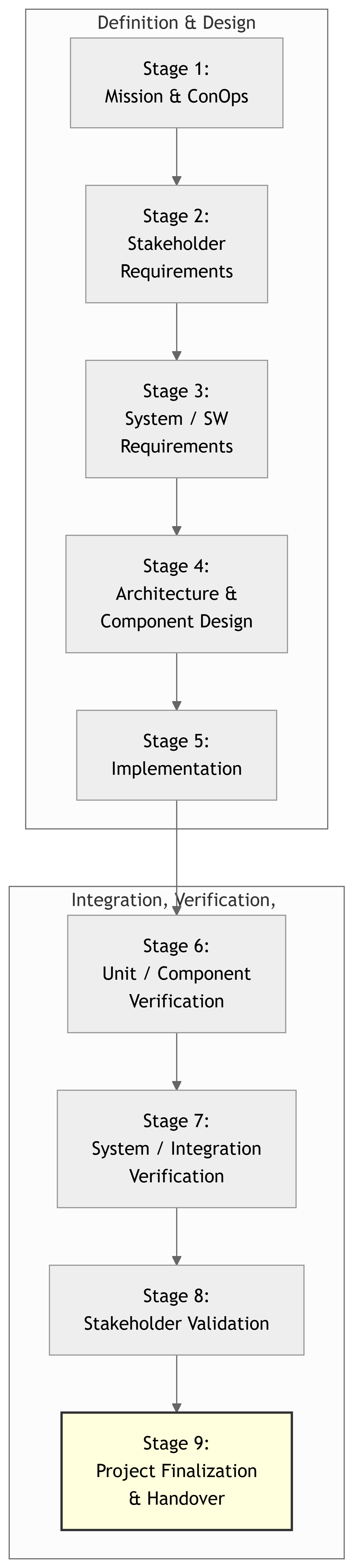
V‑Model – Where Stage 9 Fits
- Stage 6–8: Build and prove the system works as required.
- Stage 9: Close the loop:
- Finalize docs and artifacts.
- Hand over to sponsor / department / next team.
- Capture what was learned.
Stage 9 in Standards Context
Two key processes from the standards relate strongly to Stage 9:
- Information Management
- From ISO/IEC/IEEE 15288 & 29148.
- About creating, storing, organizing, and maintaining project information.
- Transition
- From ISO/IEC/IEEE 15288.
- About moving a system from development into its intended operational environment (or to a new owner).
In the capstone course, Stage 9 is where you:
- Close out Information Management: organize and package your project knowledge.
- Execute a scaled‑down Transition: demo, train, and hand off to sponsor, lab staff, or next year’s team.
Note
Your Stage 9 work is what decides whether your project is: - A one‑week demo, or - A system that someone could actually use or continue.
Information Management – What It Is
Information Management (in 15288/29148 terms) is about:
- Ensuring the right information (requirements, design, code, tests, decisions) is:
- Created when needed.
- Stored in an appropriate place.
- Organized and labeled so others can find it.
- Maintained and controlled (versions, change history).
At Stage 9, Information Management focuses on:
- Consolidating and finalizing all project information.
- Making it accessible and understandable for:
- Sponsors / lab staff.
- Instructors and reviewers.
- Future student teams.
Tip
Think of Information Management as building a library for your project: - Books = documents, code, CAD, configs. - Catalog = README, directory structure, links. - Librarian notes = what changed, what’s missing, what to be careful about.
Information Management – Key Activities at Stage 9
Typical Stage 9 activities under the Information Management process:
- Inventory Project Artifacts
- Requirements docs (DCP‑100A/B, DCP‑200).
- Design docs (DCP‑300, any schematics, HDL block diagrams).
- Source code, HDL, scripts.
- Test plans, test results, validation evidence.
- User docs and training material.
- Organize and Clean Up
- Enforce a clear directory layout in the repo.
- Remove dead files and duplicates (or clearly mark them as legacy).
- Add README files to explain each major folder and artifact.
- Finalize and Version Documents
- Ensure each major doc has:
- Title, version, date, authors.
- “Final” or release status.
- Export PDFs where appropriate for long‑term reading.
- Ensure each major doc has:
- Summarize Decisions and Known Issues
- Document key design decisions (and rationale).
- Record known bugs, limitations, and technical debt.
- Package for Handover
- Bundle the repository or create a release (e.g., Git tag, zip archive).
- Ensure external dependencies (libraries, tools) are documented.
Transition – What It Is
Transition (in 15288) is the process of:
- Moving a system from development into its intended operational environment.
- Making sure that users, operators, and maintainers can actually use and support the system.
- Verifying that necessary documentation, training, and logistics are in place.
In capstone Stage 9, “Transition” usually means:
- Handover to:
- A sponsor (e.g., company, lab, research group), or
- The ECE department (e.g., as a lab demo system), or
- A future student team continuing the work.
It includes:
- Final demo and acceptance discussions.
- User/operator instructions.
- Training sessions or videos.
- Agreement on what will happen to the hardware, accounts, and data.
Note
Transition answers the question: > “Now that we have a system, who owns it and knows how to use it?”
Transition – Key Activities at Stage 9
Typical Stage 9 activities for the Transition process:
- Define the Target Environment and Owner
- Who will own the system after the course?
- Where will it be deployed (network, lab, server, etc.)?
- Prepare Operational Documentation
- Quick‑start guide for users (e.g., lab techs, students).
- Admin/maintenance guide (e.g., how to restart, update, or reconfigure).
- Conduct Final Demonstration and Walk‑Through
- Show that system meets agreed key requirements.
- Walk sponsor/owner through normal workflows.
- Training / Knowledge Transfer
- Run a short training session (live or recorded).
- Answer questions; update docs based on feedback.
- Agree on Post‑Project Plan
- What hardware stays where; what must be returned.
- What accounts/servers will remain active (and who manages them).
- How bug reports or issues will be handled (if at all) after the course.
- Obtain Acceptance or Closure Agreement
- A signoff email/form from sponsor or advisor stating:
- They understand the status and limitations.
- They accept the handover or define follow‑up actions.
- A signoff email/form from sponsor or advisor stating:
Stage 9 vs Earlier Stages
- Stage 1–3: Decide what to build (mission, requirements).
- Stage 4–5: Decide how to build and then build it (architecture, implementation).
- Stage 6–8: Prove it works (verification & validation).
- Stage 9: Ensure it can live beyond your team (documentation, training, formal handoff).
Tip
A great Stage 9 output means: - Someone else can say “Oh, I see what this does, how to run it, and how to extend it.” - Your work doesn’t die when your team graduates.
ECE Example 1 – Smart Lab Sensor Network Handover
Recall the Smart Lab Sensor Network project from earlier stages.
At Stage 9, we focus on:
- Information Management outputs:
- Final DCP‑100A/B, DCP‑200, DCP‑300, and test reports.
- Git repository with firmware, gateway, backend, dashboard code.
- Configuration files for labs and thresholds.
- Build & deployment instructions.
- Transition outputs:
- Quick‑start guide for lab technicians:
- How to log in to the dashboard.
- How to interpret status colors.
- How to acknowledge alerts.
- Admin guide for lab manager/IT:
- How to change thresholds.
- How to restart services or update the server.
- Who to call if the VM is down.
- Handover meeting with lab manager and IT staff.
- Quick‑start guide for lab technicians:
Example – Smart Lab: Information Management Artifacts
For Smart Lab, a reasonable Stage 9 information package might include:
- Repository structure:
smart-lab-sensor-network/
  README.md
  docs/
    DCP-100A-Mission-ConOps-vfinal.pdf
    DCP-100B-StakeholderReqs-vfinal.pdf
    DCP-200-SystemReqs-vfinal.pdf
    DCP-300-ArchitectureDesign-vfinal.pdf
    TestReport-Stage7-Validation-vfinal.pdf
    UserGuide-LabTechnicians-v1.0.pdf
    AdminGuide-LabManager-IT-v1.0.pdf
  firmware/
    sensor_node/
    gateway/
  backend/
    src/
    config/
    db-migrations/
  dashboard/
    src/
    build_instructions.md
  deployment/
    install_backend_on_linux.md
    systemd-service-files/
  known-issues.md
changelog.md- Key items added in Stage 9:
UserGuide-LabTechnicians-v1.0.pdfAdminGuide-LabManager-IT-v1.0.pdfknown-issues.md(limitations, bugs).deployment/install_backend_on_linux.md.
Note
A well‑labeled repo is itself a deliverable under Information Management.
Example – Smart Lab: Transition Activities
Stage 9 Transition steps for Smart Lab:
- Identify owner & environment
- Owner: ECE Lab Manager and Lab Technicians.
- Environment: Department Linux VM + lab Wi‑Fi network.
- Deploy final version
- Install backend and dashboard on the VM.
- Configure systemd services for automatic start.
- Connect gateway and verify sensor data flow.
- Final demo & walkthrough
- Demonstrate typical use cases:
- Viewing lab statuses.
- Responding to an overheat alert.
- Show how to change thresholds.
- Demonstrate typical use cases:
- Training & Q&A
- 30–60 minute training session for techs and manager.
- Provide printed quick‑start sheet.
- Handover package
- Send a link to the Git repo and docs.
- Provide export/backup of current configuration.
- Acceptance and closure
- Lab manager signs off that:
- They understand the system and its limitations.
- They accept the hardware (or note what must be removed).
- Lab manager signs off that:
ECE Example 2 – FPGA‑Based ECG System Handover
Project: FPGA‑based real‑time ECG filter and feature detector (from earlier lectures).
Stage 9 Information Management:
- Finalized:
- HDL source and synthesis/project files (e.g., Vivado project).
- Block diagrams for the filter and feature detection modules.
- Timing reports and resource utilization (docs or exported reports).
- Testbench files and simulation results.
- Lab setup instructions (how to connect ECG simulator to FPGA board).
- Document updates:
- Short Operator Guide for lab instructors:
- How to load the bitstream.
- How to connect the input and interpret LEDs/outputs.
- Integration notes if the FPGA is part of a larger teaching lab.
- Short Operator Guide for lab instructors:
Stage 9 Transition:
- Decide where the FPGA board will live (which lab, which cabinet).
- Train at least one TA or lab instructor on usage.
- Document any safety considerations (e.g., not using real human ECG yet).
- Clarify that it is a teaching demo and not a medical product.
Warning
For safety‑related ECE projects (e.g., ECG, medical, power systems), Transition must include explicit statements of limits and intended use.
ECE Example 3 – Remote Instrument Lab Tool
Project: Remote Instrument Lab where students control lab instruments via web.
Stage 9 focus:
- Information Management:
- Document instrument control scripts (e.g., Python with VISA).
- Save configuration of the lab PC (OS, drivers, required libraries).
- Document firewall rules, ports, and URLs.
- Provide a “reset script” to bring instruments back to a known state.
- Transition:
- Train lab staff or TAs:
- How to launch/stop the instrument control service.
- How to troubleshoot common issues (instrument not found, port in use).
- Provide a small Student User Guide:
- How to book a time slot.
- How to access the web interface.
- Decide whether the system will be used in the next course offering.
- Train lab staff or TAs:
Stage 9 Deliverables – What You Owe
For this course (adapt/rename as needed), Stage 9 typically includes:
- Final Technical Report & Documents
- Final versions of DCP‑100A/B, DCP‑200, DCP‑300, and test/validation reports.
- Update with a short “As‑Built vs Planned” section noting major deviations.
- User & Admin Documentation
- User guide(s) for end‑users (students, technicians, operators).
- Admin / maintenance guide for those who will run or modify the system.
- Code & Artifact Repository
- Clean, organized code/HDL repo with README and build/run instructions.
- Any CAD/PCB files, schematics, and firmware images as appropriate.
- Known Issues & Future Work Summary
- Clear list of known bugs, limitations, and open tasks.
- Recommendations for future teams or maintainers.
- Handover Package
- List of all hardware handed over (with serial numbers, locations).
- Login/account information (or procedures to get credentials) for servers and cloud accounts, respecting security policies.
- Links to video demos or training sessions, if created.
- Sponsor / Advisor Handover Meeting
- Final demo and walkthrough.
- Discussion of acceptance, next steps, and closure.
Important
Stage 9 is not only about grading. It’s about delivering a professional artifact that respects your stakeholders’ time and trust.
Information Management – Practical Checklist
Before calling your project “done”, check:
Tip
Have one team member unfamiliar with part of the system try to follow the docs. If they get stuck, your Information Management is not finished.
Transition – Practical Checklist
Before handover:
Warning
Unmanaged credentials (e.g., passwords in source files or on slides) are a security incident, not a professional handover.
Common Pitfalls in Stage 9
- “We’ll document later” → never happens
- Code is left undocumented; later teams cannot reuse it.
- Scattered information
- Docs in emails, random Google Drives, team laptops, not in the project repo.
- No clear owner
- Hardware ends up in a box; nobody knows who is responsible.
- Unrealistic claims
- Saying “production‑ready” when it is actually prototype quality.
- Ignoring licensing/permissions
- Using proprietary tools or IP without clarifying usage rights in the handover.
Warning
A great demo with poor handover is a failed Stage 9. A modest demo with excellent handover can still be a successful project.
Summary – Stage 9 Takeaways
- Information Management (15288/29148)
- Create, organize, and preserve the knowledge of your project.
- Finalize documents, code, and evidence into a coherent package.
- Transition (15288)
- Move the system from “student project” into an operational or maintainable state.
- Prepare users, operators, and future developers to take over.
- Key Outputs
- Final technical & user documentation.
- Clean, organized repository.
- Handover meeting, training, and explicit acceptance/closure.
- ECE Examples
- Smart Lab Sensor Network → lab manager & techs.
- FPGA ECG system → lab instructors & TAs.
- Remote Instrument Lab → future course staff & students.
Important
Stage 9 is your chance to show you can think like a professional engineer, not just a student who can get something working once.
Next Steps for Your Team
- Plan Your Stage 9 Work Early
- Don’t leave documentation and handover to the last week.
- Assign clear responsibilities:
- “Doc lead”, “Deployment lead”, “Training lead”.
- Build Your Information Package
- Standardize your repo structure.
- Finalize key documents and export stable versions.
- Design Your Transition
- Identify who is taking over and what they need.
- Prepare user/admin guides and demo scripts.
- Schedule Handover Interactions
- Book time with sponsor/advisor for:
- Final demo.
- Training session.
- Acceptance discussion.
- Book time with sponsor/advisor for:
- Reflect and Capture Lessons Learned
- Write a short “lessons learned” section or doc:
- What went well, what didn’t, what you’d do differently.
- Write a short “lessons learned” section or doc:
Tip
A strong Stage 9 deliverable leaves your project in a state where you would be proud to hand it to a future employer with your name on it.