Stage 3 – System / Software Requirements
Capstone Design
Imron Rosyadi
Stage 3 – System / Software Requirements
From Stakeholder Needs to Engineer‑Ready Specifications
Capstone Design – Stage 3 Focus Session
Learning Objectives – Stage 3 Session
By the end of this session, you will be able to:
- Explain the purpose of Stage 3 – System / Software Requirements in the V‑Model.
- Describe the 29148 System/Software Requirements Definition process and its main activities.
- Describe the 29148 Requirements Analysis process and what “good requirements” look like.
- Write clear, testable System/Software Requirements (
REQ-*) that are traceable fromSTR-*. - Relate these concepts to ECE capstone examples and to the DCP‑200 deliverable.
Where Stage 3 Fits in the V‑Model
Note
Stage 3 is the bridge between: - Stakeholder Requirements (STR-*) in Stage 2, and - Design & Implementation in Stages 4–5, and - Verification (VER-*) in Stages 6–7.
Stage 2 → Stage 3 → Stage 4 – Big Picture
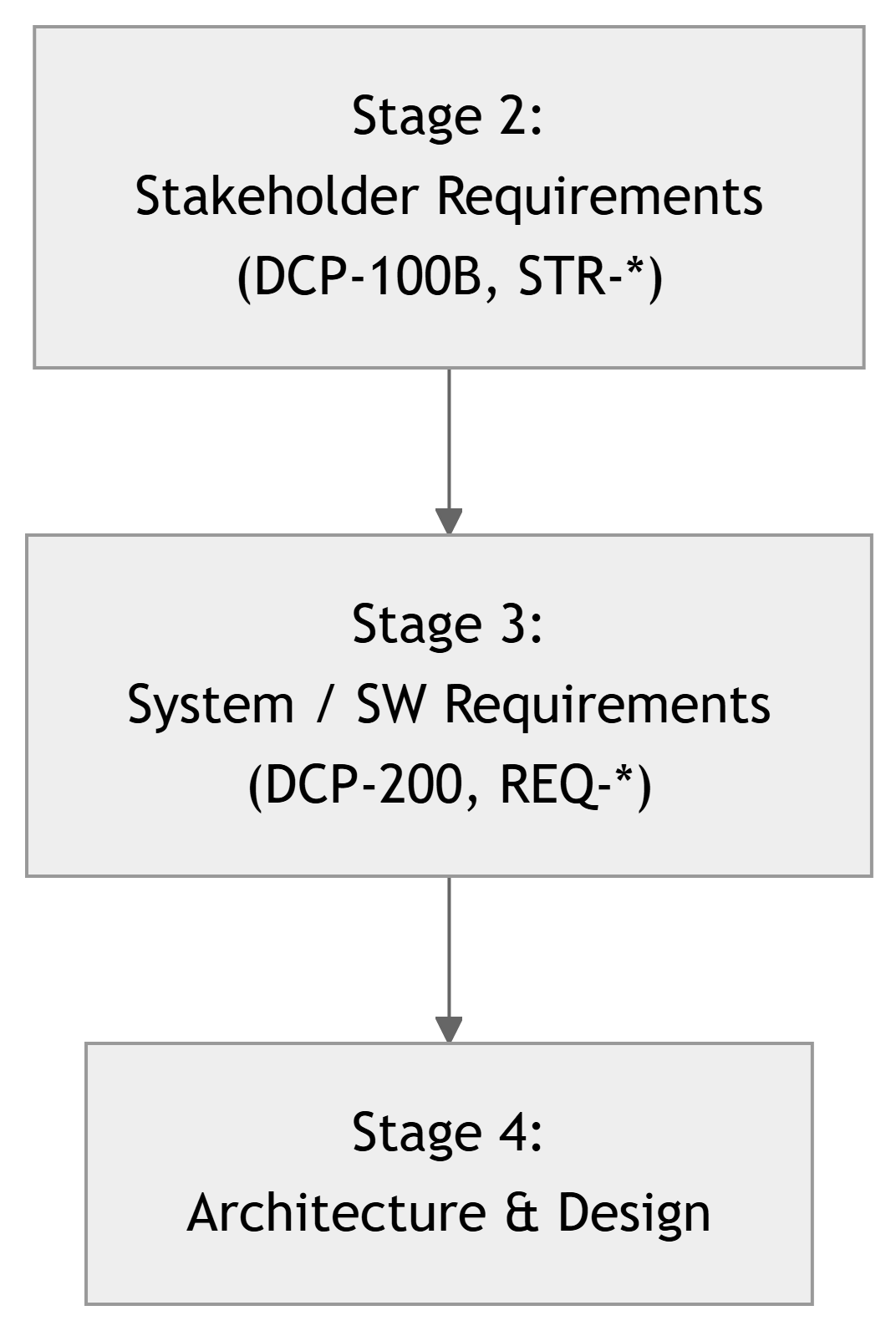
- Stage 2: “Lab tech must be able to see all labs on one screen.” (
STR-*) - Stage 3: “System shall support X labs, update every Y seconds, with Z error handling.” (
REQ-*) - Stage 4: “We’ll implement this with microcontroller A, protocol B, backend C, etc.”
Tip
If Stage 3 is weak, design teams either: - Guess what to build, or - Design around assumptions instead of agreed requirements.
ISO/IEC/IEEE 29148 – Relevant Processes for Stage 3
In Stage 3, we mainly use two 29148 processes:
- System / Software Requirements Definition
- Transform stakeholder requirements (
STR-*) into system/software requirements (REQ-*). - Define what the system must do and how well, in technical but still design‑independent terms.
- Transform stakeholder requirements (
- Requirements Analysis
- Check requirements for quality: complete, consistent, unambiguous, feasible, verifiable, and traceable.
- Resolve conflicts, partition requirements, and prepare for architecture and design.
Important
Stage 3 is not just “writing a list.” It is an engineering process: transform, refine, analyze, and organize requirements.
29148: System / Software Requirements Definition – Purpose
Purpose (adapted from 29148): To establish a set of system and/or software requirements that correctly and completely:
- Satisfy the stakeholder requirements (
STR-*). - Define the system’s functions, performance, interfaces, constraints, and qualities.
- Provide a basis for design and for verification of the system.
These requirements are typically documented in a System Requirements Specification (SyRS) or Software Requirements Specification (SRS).
For this course, we consolidate them into DCP‑200 – System Requirements.
29148: System / SW Requirements Definition – Activities
Key activities you will perform in Stage 3:
- Derive system/software requirements from stakeholder requirements
- For each
STR-*, ask: “What must the system actually do or guarantee?” - Create one or more
REQ-*that satisfy that need.
- For each
- Specify functional requirements
- Define inputs, outputs, behaviors, modes, error handling.
- Specify non‑functional requirements
- Performance, reliability, security, safety, usability, etc., but now in technical, quantitative terms.
- Define interfaces and external interactions
- Hardware interfaces (sensors, actuators).
- Communication interfaces (protocols, data formats, APIs).
- Record assumptions and constraints
- Platform assumptions, technology constraints, environmental bounds.
These outputs collectively form the System Requirements Specification (DCP‑200).
29148: Requirements Analysis – Purpose
Purpose (adapted from 29148): To ensure that the set of requirements (REQ-*) is:
- Correct – aligns with stakeholder intent.
- Complete – covers necessary behaviors and qualities.
- Consistent – no internal contradictions.
- Unambiguous – each requirement has one clear meaning.
- Feasible – realistic with technology, schedule, and budget.
- Verifiable – testable by analysis, test, inspection, or demonstration.
- Traceable – each
REQ-*can be traced to at least oneSTR-*and later to design and test cases.
Note
Requirements Analysis is basically quality control for your requirements. You will iterate: write → check → refine → approve.
What Is a System / Software Requirement (REQ-*)?
A System or Software Requirement (REQ-*) is a statement that specifies:
- A capability, function, performance level, interface, or constraint
- That the system or software must satisfy,
- Expressed in technical, design‑independent, testable terms.
Typical ID patterns in this course:
REQ-SY-###– overall system requirement.REQ-SW-###– software‑specific requirement (e.g., backend, UI).REQ-HW-###– hardware‑specific requirement (optional, if you partition).
Important
Key differences vs STR-*:
STR-*: stakeholder language, outcomes, scenarios.REQ-*: technical language, specific behaviors and properties the system must show.
Example Chain: From STR-* to REQ-*
Using the Smart Lab Sensor Network example:
Stakeholder Requirement:
STR-SY-001: Lab technicians shall be able to view the current temperature and humidity for each monitored lab from a single centralized dashboard.
Derived System Requirements (REQ-*):
REQ-SY-001: The system shall store, for each monitored lab, the latest measured temperature (°C) and relative humidity (%) values.REQ-SY-002: The system shall provide a web‑based dashboard accessible over HTTP(S) that displays the current temperature and humidity for all configured labs on a single page.REQ-SY-003: The system shall refresh displayed sensor values at least once every 60 seconds during normal operation.
Each REQ-* is:
- Technical (data types, HTTP(S), refresh interval).
- Testable (we can measure refresh rate, inspect UI).
- Still design‑independent (doesn’t say “use React” or “use sensor X”).
ECE Example – Remote Lab Access: STR-* → REQ-*
Stakeholder Requirement:
STR-SY-101: Students shall be able to remotely access assigned lab instruments during scheduled time slots using their university credentials.
Candidate System Requirements:
REQ-SY-101: The system shall provide a web portal where students can log in using the university single sign‑on (SSO) system.REQ-SY-102: The system shall allow authenticated students to reserve remote lab sessions for specific time slots and instruments.REQ-SY-103: During an active reservation, the system shall establish a remote control session to the assigned lab PC or instrument with exclusive control for the reserving student.REQ-SY-104: The system shall enforce that no more than one student has control of a given instrument at any time.
Tip
Note how we’ve moved from: “students can remotely access labs” → concrete behaviors about login, reservation, session control, and exclusivity.
Classes of System / Software Requirements
In DCP‑200, it is helpful to organize REQ-* by class:
- Functional Requirements
- What the system must do (behaviors, functions).
- Interface Requirements
- Interactions between system and users, hardware, networks, other software.
- Performance Requirements
- Timing, throughput, capacity, accuracy, etc.
- Reliability, Availability, Maintainability (RAM)
- Error handling, uptime, fault tolerance, maintainability.
- Security & Safety Requirements
- Authentication, authorization, encryption, safe states, hazard mitigation.
- Usability & Human‑Factors Requirements
- UI constraints, response time perceived by users, accessibility.
- Design & Implementation Constraints (if any are mandated)
- Mandated tech stack, OS, standards to comply with, etc.
Note
These categories help reviewers and team members find related requirements and avoid omissions.
Writing Good REQ-*: Characteristics
According to 29148, a good requirement is:
- Necessary – it must be included, not optional wish‑list.
- Correct – accurately represents a stakeholder need or constraint.
- Unambiguous – only one interpretation.
- Complete – expresses a full idea; not missing important conditions.
- Consistent – does not conflict with other requirements.
- Feasible – realistic given constraints.
- Verifiable – you can test it by inspection, analysis, demonstration, or test.
- Traceable – linked to its source (
STR-*, mission objective).
Tip
Simple test: Can a test engineer who never met the stakeholder read the requirement and design a test to check it? If not, it needs work.
Example – Improving a Weak Requirement
Weak requirement:
REQ-SY-200: The dashboard shall load quickly.
Problems: ambiguous, not measurable.
Improved requirements:
REQ-SY-200: For on‑campus users connected via wired or institutional Wi‑Fi, the dashboard shall display the list of labs and their current status indicators in ≤ 3 seconds in at least 95% of requests measured over a typical week of operation.
REQ-SY-201: In the event that the dashboard cannot retrieve current data within 10 seconds, it shall display a visible warning message indicating a data retrieval issue.
Now we can:
- Measure load times (performance test).
- Verify the warning behavior in failure conditions.
Interfaces – Critical in ECE Projects
Many ECE projects are about embedded systems and communication. Interface requirements are essential.
Example: Smart Lab Sensors → Gateway
REQ-HW-010: Each sensor node shall measure temperature in the range 0–50 °C with a resolution of at most 0.1 °C and an accuracy of ±0.5 °C.REQ-HW-011: Each sensor node shall measure relative humidity in the range 20–90 %RH with a resolution of at most 1 %RH and an accuracy of ±3 %RH.REQ-SY-020: Each sensor node shall transmit temperature and humidity readings to the gateway at least once every 60 seconds over the chosen wireless protocol.REQ-SY-021: The gateway shall reject sensor messages that fail a message integrity check (e.g., CRC, HMAC).
Example: Backend API
REQ-SW-030: The backend shall expose a REST API endpointGET /api/v1/labsreturning a JSON list of labs with their latest readings and status indicators.REQ-SW-031: The API shall respond with HTTP status code 401 Unauthorized for any request without valid authentication credentials.
Note
Interface requirements describe what data crosses boundaries and under what conditions, not the internal code structure.
ECE Example – DSP / FPGA Signal Processing Chain
Consider a capstone project: FPGA‑based real‑time ECG signal filter.
Stakeholder needs (simplified):
- “We need clean ECG waveforms in real time to monitor patients.”
- “The filter must not distort clinically important features (QRS complex, ST segment).”
Derived system/software requirements:
REQ-HW-100: The FPGA module shall sample the input ECG signal at ≥ 500 samples per second per channel with at least 12‑bit resolution.REQ-SW-100: The digital filter shall attenuate frequency components above 40 Hz by at least 20 dB while preserving pass‑band (0.05–40 Hz) within ±1 dB.REQ-SY-101: The end‑to‑end latency from analog input at the A/D converter to the filtered digital output shall be ≤ 100 ms.REQ-SY-102: Under normal operating conditions, the system shall process continuous ECG data for at least 24 hours without buffer overflows or data loss.
Tip
DSP‑centric projects often have strong performance and signal‑quality requirements. Make those explicit and testable in REQ-*.
Requirements Traceability – STR-* ↔︎ REQ-*
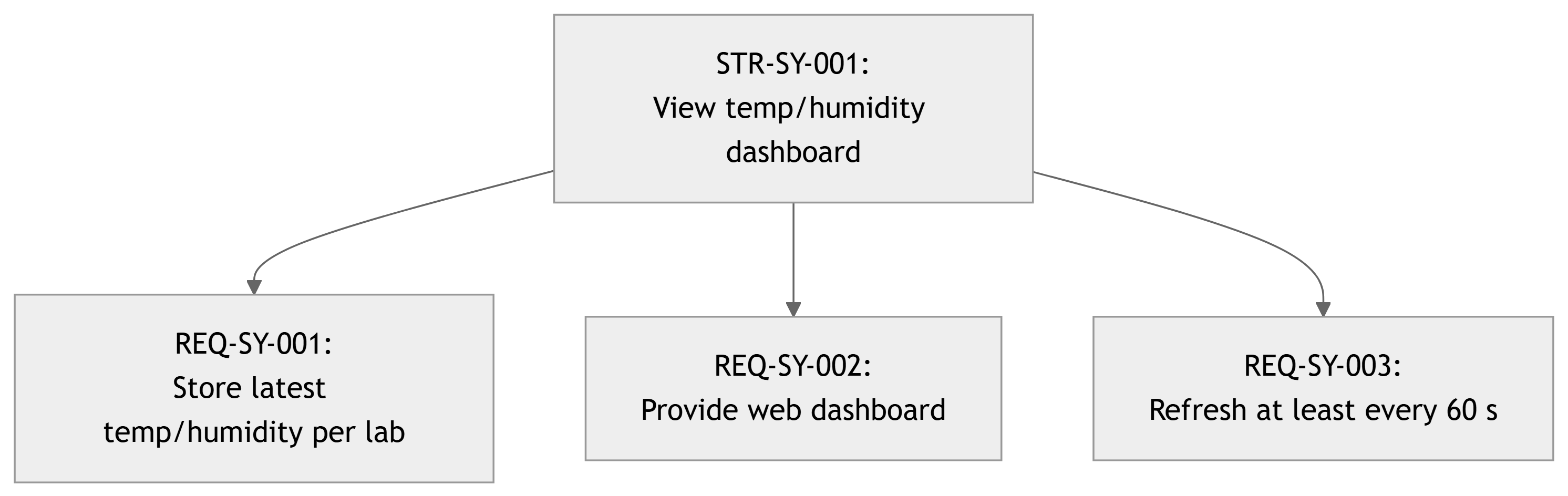
In DCP‑200, you should be able to map:
- From each
STR-*(Stage 2) → to one or moreREQ-*(Stage 3).
And later:
- From each
REQ-*→ to one or more design elements and verification cases (VER-*).
Note
Traceability helps you ensure that: - You didn’t invent requirements that nobody asked for; - You didn’t miss any stakeholder needs when defining the system.
DCP‑200 – System Requirements Specification
In this course, DCP‑200 captures your Stage 3 outputs. Typical structure:
- Introduction and Scope
- What system is specified; relation to DCP‑100B.
- Overall Description
- High‑level system context, operating environment (brief).
- System / Software Requirements (
REQ-*)- Organized by category: functional, interfaces, performance, RAM, security, etc.
- Traceability to Stakeholder Requirements
- Mapping
STR-*→REQ-*.
- Mapping
- Assumptions and Constraints
- Technology assumptions, resource limits, mandated platforms.
- Requirements Rationale & Notes (optional but helpful)
- Why certain thresholds or numbers were chosen.
- Verification Planning Overview (Preview)
- For major
REQ-*, note likely verification methods (test, analysis, inspection).
- For major
Warning
Course rule: You cannot proceed to architecture and detailed design (Stage 4) until DCP‑200 is approved at the Stage 3 gate.
Example – Extract from DCP‑200 (Smart Lab Network)
System Requirements (excerpt):
| ID | Category | Description | Source (STR-*) |
|---|---|---|---|
| REQ-SY-001 | Functional | The system shall store the latest measured temperature (°C) and relative humidity (%RH) for each configured lab. | STR-SY-001 |
| REQ-SY-002 | Interface | The system shall provide a web dashboard endpoint /dashboard accessible via HTTPS for authorized users. |
STR-SY-001, 030 |
| REQ-SY-003 | Performance | The dashboard shall refresh displayed sensor readings for all labs at least once every 60 seconds. | STR-SY-010 |
| REQ-SY-004 | Functional | When any lab’s temperature exceeds a configured threshold for more than a configured duration, the system shall create an “overheat” alert event. | STR-SY-002 |
| REQ-SY-005 | Performance | The system shall send notifications associated with “overheat” alerts to all users with role Lab Technician within 120 seconds of alert creation. | STR-SY-002, 011 |
Analysis notes (informal):
REQ-SY-003: 60 s refresh chosen as trade‑off between timeliness and network load.REQ-SY-005: 120 s chosen to be significantly less than the time for meaningful equipment overheating (based on lab manager input).
Planned verification examples:
VER-SY-003: Automated test that checks refresh interval on dashboard.VER-SY-005: Simulated overheating scenario with timestamped logs.
Tip
Note how each REQ-* references one or more STR-*, and is written in a way that invites clear verification.
ECE Example – Wearable Medical Monitor (System Requirements)
For the wearable heart‑rate and activity monitor:
Stakeholder requirement:
STR-SY-202: Nurses shall receive an alert within 5 minutes when heart rate exceeds a configured threshold for more than 2 minutes.
Derived REQ-*:
REQ-SY-210: The device shall sample heart rate at ≥ 1 Hz (one measurement per second) during normal operation.REQ-SY-211: The device shall compute a rolling average heart rate over a sliding window of at most 10 seconds for threshold comparison.REQ-SY-212: When heart rate > threshold for ≥ 120 consecutive seconds, the device shall generate an internal “tachycardia event”.REQ-SY-213: For each tachycardia event, the system shall send an alert message to the nurse station system within 300 seconds of event detection.
Now: - Sensor sampling, signal processing, and communication are quantified. - Nurses’ “within 5 minutes” expectation is mapped into technical requirements.
Common Pitfalls in Stage 3
- Copy‑pasting
STR-*into DCP‑200 with no added detail- System requirements need technical, testable detail.
- Design decisions disguised as requirements
- “System shall use Raspberry Pi 4 and Python Flask.”
- Unless mandated by stakeholders, such choices belong in design, not requirements.
- Over‑constraining the solution
- Specifying internal algorithms or data structures when not required by stakeholders.
- Vague or incomplete requirements
- “System shall be reliable.” (What does that mean?)
- “System shall be secure.” (Against what threats? How measured?)
- Inconsistent units or thresholds
- Mixing °C and °F, milliseconds and seconds, etc., without clarity.
Warning
Ask yourself for each REQ-*: - Can I unambiguously test this? - Does it leave reasonable freedom for design choices?
Summary – Stage 3 Key Points
- Stage 3 uses 29148’s:
- System / Software Requirements Definition – derive
REQ-*fromSTR-*. - Requirements Analysis – ensure
REQ-*are high‑quality and consistent.
- System / Software Requirements Definition – derive
- Main outcomes:
- A System Requirements Specification (DCP‑200) with categorized, testable
REQ-*. - Traceability from stakeholder needs (
STR-*) to system requirements (REQ-*).
- A System Requirements Specification (DCP‑200) with categorized, testable
- Good
REQ-*are:- Technical yet design‑independent.
- Clear, unambiguous, realistic, and verifiable.
- DCP‑200 is your Stage 3 gate artifact:
- Design and implementation should not start in earnest until DCP‑200 is agreed and stable.
Important
Stage 3 defines what the system must do and how well, in enough detail that engineers can design it and testers can verify it.
Next Steps for Your Team
- Review your DCP‑100B (
STR-*)- Ensure stakeholder needs are clear and agreed.
- Draft DCP‑200
- For each key
STR-*, write correspondingREQ-*. - Use categories: functional, interface, performance, security, etc.
- For each key
- Perform Requirements Analysis
- Use a checklist to refine wording and resolve contradictions.
- Review within your team and with your advisor.
- Prepare for the Stage 3 Gate Review
- Be ready to explain how your
REQ-*satisfySTR-*. - Be ready to answer: “How would you verify this requirement later?”
- Be ready to explain how your
Tip
Doing Stage 3 well saves you from painful redesigns later. It is where you lock in the target that design and tests will aim for.